Electron Update Speed: Several Iterations of OTA Redesign
LobeHub's Electron update system from renderer OTA to a shell/core split, content-addressed deltas, pack and Range downloads, startup recovery, and Sparkle delta chains.
The margin notes are this blog's reading notes and practical commentary; they are not part of the source article.
I've actually been exploring Electron updates for a long time now.
It started with Folo, where I built an OTA system for the renderer layer. I hand-rolled the whole thing myself, with no help from AI. I didn't think it through much back then: plenty of edge cases went unhandled, and the architecture wasn't great either.
With LobeHub, I picked it up and kept going. This round came together through one change after another, and going by PRs, the timeline looks roughly like this:
- On August 24, renderer hot updates shipped, so the frontend can be swapped without restarting the app.
- Over the next few days I kept reworking the OTA package: gzip compression, keeping only a baseline and the two most recent deltas, isolation by release version, and a switch to the V2 package format.
- On September 12, I tried Sparkle delta updates on the macOS canary channel, though that PR hasn't been merged yet.
- On September 28, I split app.asar into a very thin shell and a signed core that can be updated over the air on its own, with support for reload, relaunch, and rollback.
- On September 29, the built-in core was also packed as an ASAR, and OTA packages became downloadable by byte range.
The usual way to update an Electron app is a full update, which you can do with electron-updater.
Why I don't want to use electron-updater's full updates
In LobeHub, a full update takes about 10 seconds, from the moment the app quits until it opens again. I use a Mac day to day, so I sit through those 10 seconds on every release. On macOS, electron-updater runs on top of Squirrel.Mac: it first downloads the complete zip of the new version, and after the app quits, a process called ShipIt replaces the entire .app bundle and then relaunches the app.
electron-updater doesn't download the full package every time, either. It has an incremental download mechanism called blockmap. But in my case it had two problems: it's slow to generate, and even a small version bump still downloads several megabytes.
How blockmap saves bandwidth
At build time, electron-builder cuts the installer into lots of small blocks of ten-odd KB each, computes a fingerprint for every block, and stores them in a .blockmap file. During an update, the client compares the old and new blockmaps block by block: blocks with matching fingerprints are copied straight from the local old package, and only blocks whose fingerprints changed get downloaded.
The idea is sound. The problem is that it slices the installer after compression.
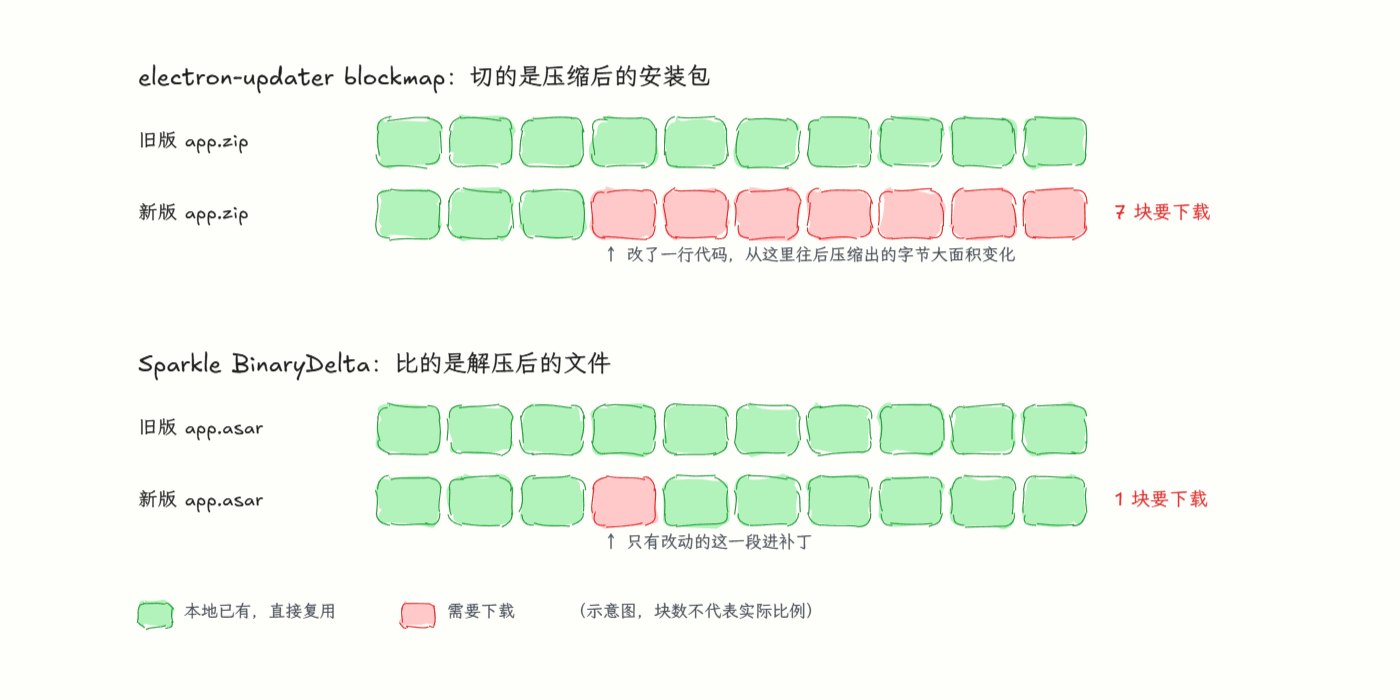
Look at the top half of the diagram first. Compression is a bit like rewriting a whole book in shorthand: change a single character in the original, and the shorthand from that point on may change entirely. So blocks before the change still match, but most blocks after it don't, and the client has to download them again. And all the business code happens to live in app.asar, the largest file in the installer, which gets touched in nearly every release.
The asar format amplifies changes too. Its header is a directory table that records the byte offset where each file starts. If one file grows by a few bytes, the start positions of every file after it have to change, so most of the table gets rewritten.
Now the bottom half: Sparkle takes a different route. Its BinaryDelta tool directly compares the old and new .app directories. Unchanged files stay out of the patch, and for changed files it uses bsdiff to compute a binary diff, so the patch records only the exact bytes that differ and their new contents. The comparison happens after decompression, so when you change one line of code, the patch size mostly tracks the real amount of change instead of being inflated by compression.
As for the slow generation: blockmap has to scan the entire installer from start to finish on every build, computing fingerprints block by block. In LobeHub's CI, that step alone takes a while.
Renderer-layer OTA: no need to touch the asar
The simplest case is OTA for the renderer layer, which doesn't even need to touch the asar.
To explain why, let's first go over what's inside an asar.
app.asar is the archive of application code that Electron produces when packaging, structurally similar to a tar file. On startup, Electron first opens the package.json inside it and reads its main field to find and run the main-process entry; the main process then creates a window and loads the renderer.
A complete asar generally has three parts: main, preload, and renderer. The key point is that which URL or file the window loads is something we write ourselves in main (win.loadURL() or win.loadFile()), and it doesn't have to come from the asar. So you can bundle a copy of the renderer in the app as a fallback, download newer renderers to a location outside the asar, and have the window load the new copy directly. That's renderer OTA.
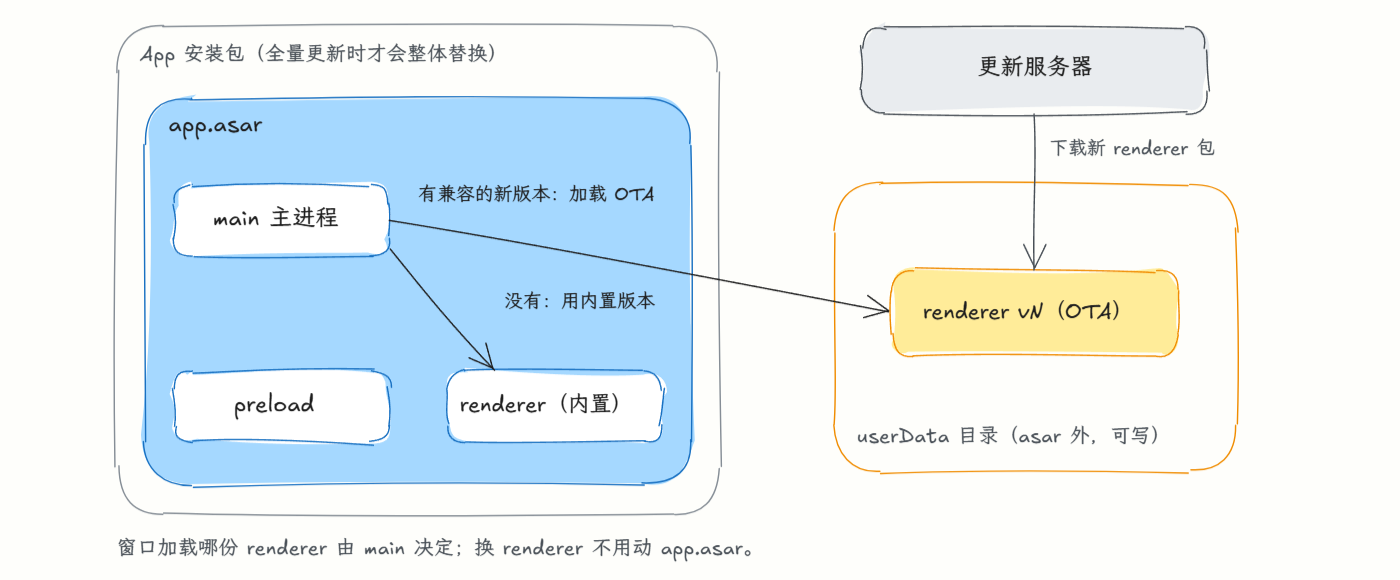
In the diagram, main and preload inside the asar never change. When main starts, it checks whether userData contains a newer renderer that's compatible with it: if so, it loads that one; if not, it falls back to the version bundled in the asar.
To prevent tampering, we need signing and verification.
Of course, the first version in Folo didn't consider tampering at all, so it had no tamper protection whatsoever. Later, in LobeHub, we added public/private-key signature verification to the artifacts.
The hard part here: how do you know whether a given release can go out via OTA, or needs a full update?
OTA is possible only if:
- Main's ABI hasn't changed.
- The Electron version hasn't changed.
- Main's dependencies haven't changed.
Folo used a flat project structure, without a workspace full of shared packages. No package was ever used by both main and renderer.
In LobeHub, though, that problem is magnified. The workspace's package dependency tree is far more tangled: when code in a sub-package changes, you can't easily tell whether it should trigger OTA, and one careless slip can cause errors from ABI mismatches.
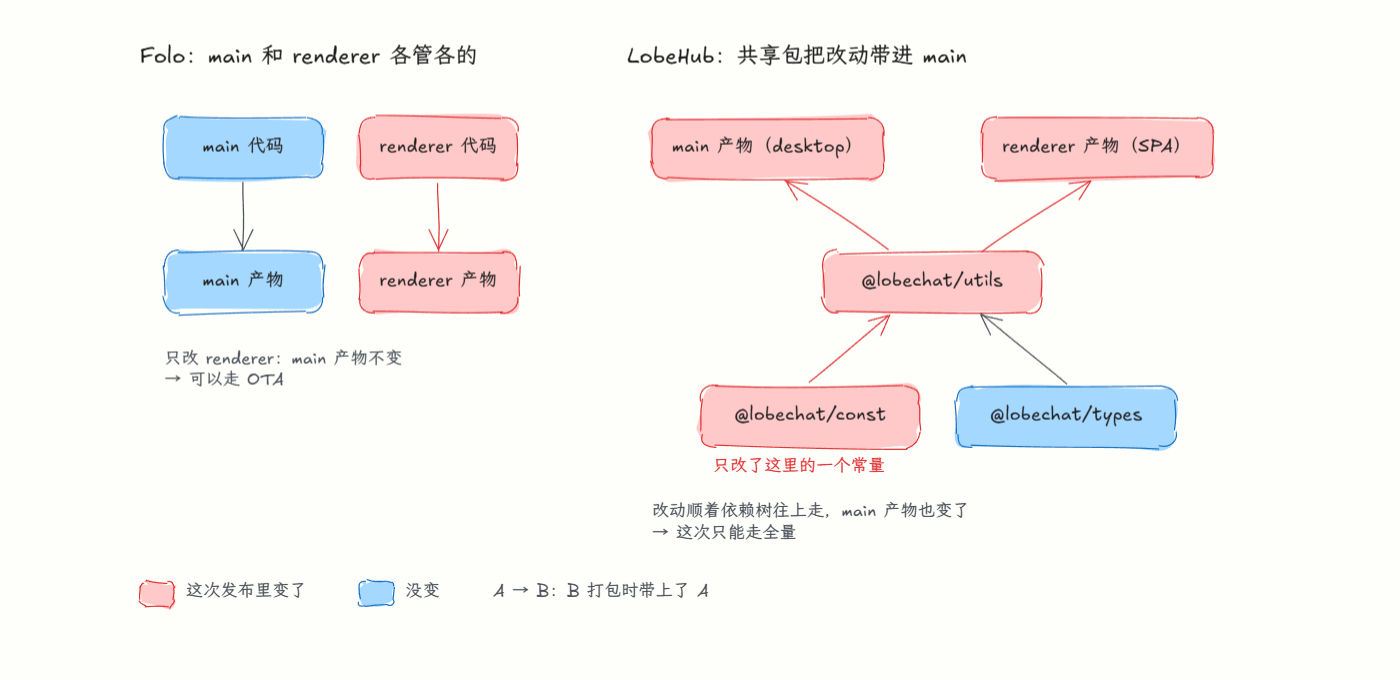
Take a real dependency chain from LobeHub: @lobechat/const is imported by @lobechat/utils, and @lobechat/utils is used by both desktop's main and renderer. If you change just one constant in const, it looks like a frontend concern, but main's output changes too. The deeper the dependency tree, the harder that path is to spot by eye.
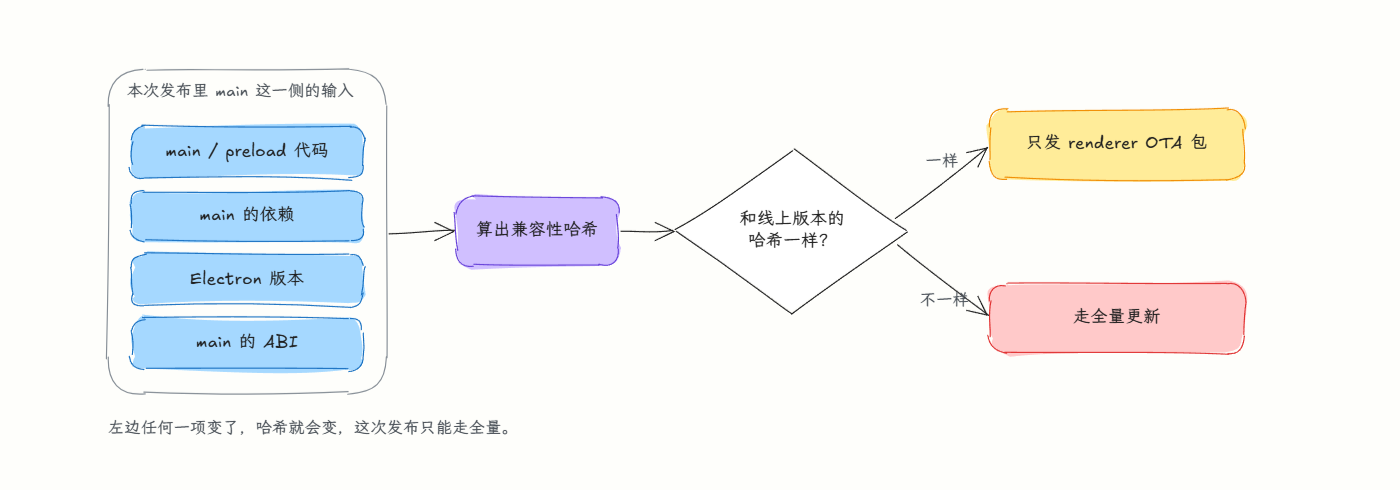
In other words, once the code of preload or main, or the built artifacts of their dependencies, changes, renderer OTA is off the table.
To fix this, we followed up with a series of PRs to make the check more accurate and finer-grained, so we could tell whether OTA is appropriate and feasible for a given release: hashing main's output, deriving compatibility from source inputs, and stabilizing the compatibility check and full-release state.
But it turned out this approach was extremely complex. Before the renderer OTA was replaced, the scripts that decide “can this release go OTA?” alone came to nearly a thousand lines: mainHash.mjs at 469 lines, mainHashGraph.mjs at 376, and validateMainHash.mjs at 118, plus another 582 lines of tests. I wrote this algorithm with the help of a frontier model, and its readability and maintainability were genuinely terrible.
All that just to OTA a renderer: a long, convoluted algorithm just to make the call. Looking back, I think the direction itself was wrong.
A new direction: the asar as just a bootstrapper
Discord's core app bundles no business code at all; its asar is just a resource bootstrapper. That comes with a much-criticized problem: every time you open Discord after downloading it, a small update window pops up first, and on a bad network you may wait a very long time.
We can follow Discord's line of thinking too: treat the asar as a bootstrapper that loads the main-layer and renderer-layer code. That way we no longer have to worry about whether main affects renderer updates. We only need to check whether the underlying layer that main depends on has changed to decide between a full update and OTA.
By “underlying layer” I mean this: whenever the Electron version changes, the ABI changes with it. Beyond that, there's native code and native bindings.
That said, I don't agree with Discord's approach of keeping the actual code entirely outside the app. So we took its strengths and added something of our own: shipping the business code as a baseline inside the app too. That way a freshly installed app opens right away, no network connection needed.
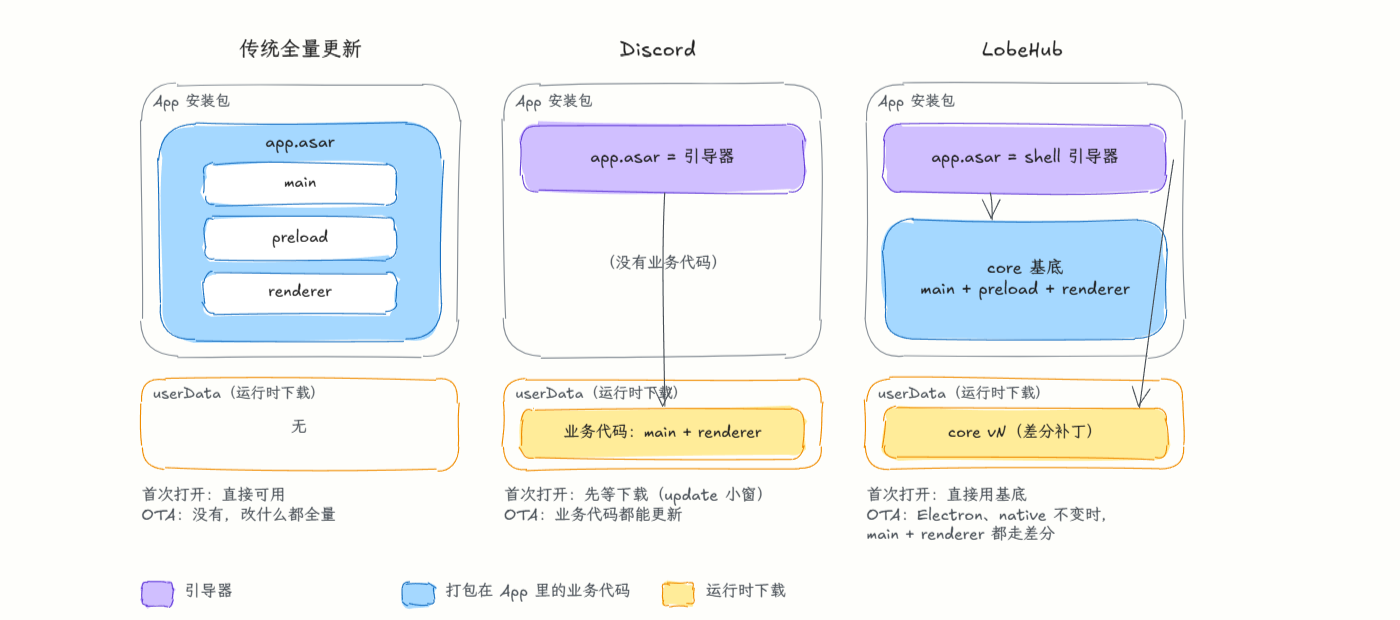
The three approaches differ in where the business code lives. The traditional approach stuffs everything into app.asar, leaving no room for OTA. Discord puts it all outside, so the first launch has to wait for a download. LobeHub gets both: the installer carries a core baseline that works as soon as you open it, and later versions are downloaded into userData as delta patches, with the shell deciding which copy to load.
For later OTA releases, we use the Sparkle-style delta approach mentioned earlier.
Validating on Canary first
We validated this migration on the Canary channel first. Canary triggers an update every time a branch is merged, so it moves very fast.
With a traditional full build, from start until all the installers were ready, the median in the last few days of September was 64 minutes, and the fastest run still took 43 minutes. With OTA, a renderer-only release has a median of 4.3 minutes, and today's core OTA ships end to end in about 8 minutes when runners are idle. Shipping got dramatically faster.
How core handles deltas
The other thing to work out was how to make OTA incremental. A complete, fully compressed app is around 200 MB, and core's output is still over 100 MB if you download it as one uncompressed package, which doesn't save much. So we made core's files content-addressed, which also lets us support cross-version incremental updates later.
This part went through two versions: one merged on September 28, and a second version on September 29. First, the September 28 version (#19501).
When CI cuts a release, every file in core gets a sha256 fingerprint and is uploaded individually as objects/<sha256>.zst. If the old version has a matching file, CI also generates a zstd delta patch, patches/<old sha256>-<new sha256>.zst. The manifest records the entire file tree: the sha256 and size for each path.
The delta patches use zstd's dictionary compression: the old file serves as the dictionary for compressing the new one. While compressing, zstd looks for repeated segments in the dictionary. For unchanged parts it only needs to record something like “starting at byte N of the old file, copy this many bytes,” and only the bytes that really changed are written into the patch. The client decompresses with the same old file as the dictionary to reconstruct the new file, then verifies it against sha256 and writes it only if it matches.
Deciding which old file pairs with which new file takes some care. Identical content is simply reused, and files at the same path get patched. Vite output filenames contain a content hash (index-a1b2c3d4.js), so changing one line of code changes the filename. We therefore strip that hash and pair files by the remaining name. Patches are only made for renderer and CLI files. If the new file is under 16 KB, or the patch would be more than half the size of the new file, we skip the patch and download the full object.
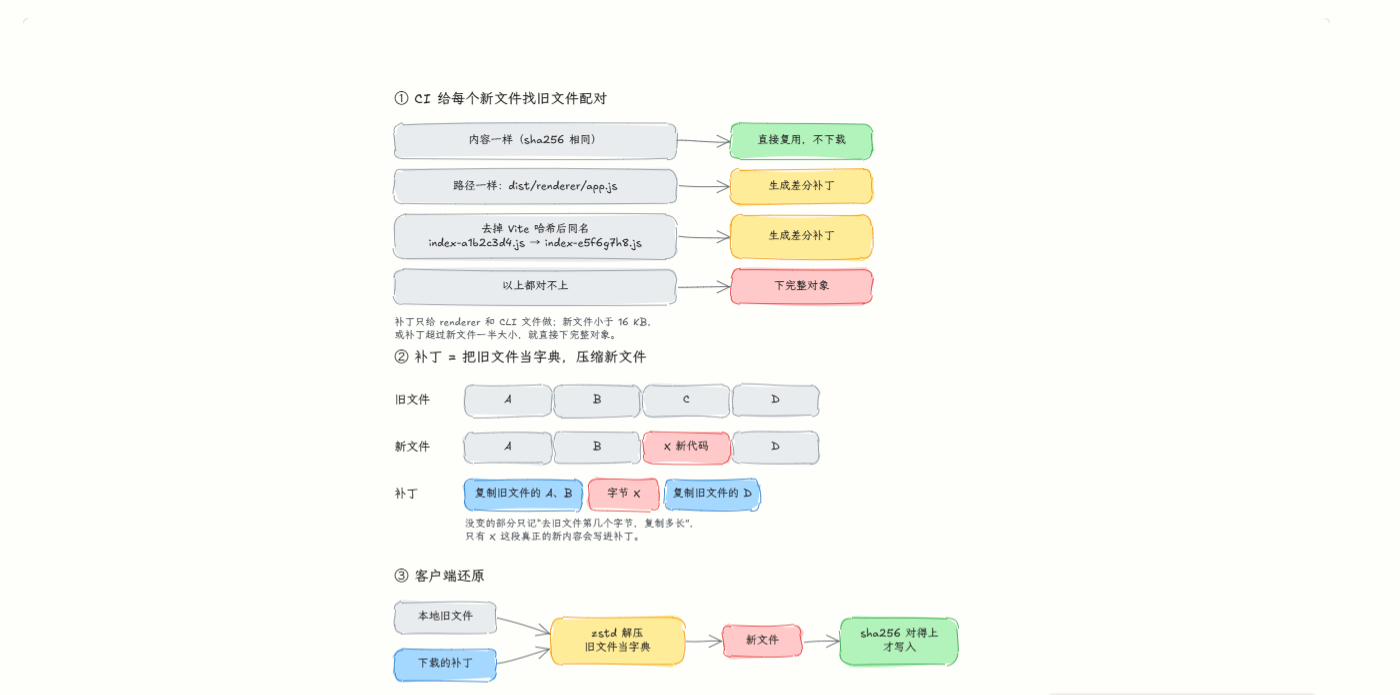
After getting the manifest, the client first checks it against the files it already has locally (the built-in baseline, the current version, and the object cache) to work out which sha256s are missing. For missing files it prefers downloading a delta patch and applying it to the local old file to produce the new one; if there's no patch, it downloads the full object. If too many are missing (more than 400) or anything fails midway, it falls back to downloading the whole package. Finally, following the file tree, it links or copies the objects one by one into the new version's directory.
Since files are found by content rather than version number, skipping a few versions before updating is no problem: as long as a file's content has appeared locally, it doesn't need to be downloaded again.
The problem with this version was installation: core has several thousand small loose files, which had to be copied one by one at install time, and copying lots of small files is very slow. That's also why core was turned into an asar on September 29, which I'll get to below.
Version two: core packed as an asar, OTA over Range requests
On September 29 I found the previous day's approach wasn't good either, for these main reasons:
- Every time an OTA was generated, each JS file became its own object on S3, which meant far too many uploads.
- The 400-file cap ignored actual size: if 401 files were missing but added up to only 300 KB, it would still download the full package. That makes no sense; the decision should be based on actual size.
- After applying deltas, userData still held the full set of unbundled individual files.
That led to the September 29 change (#20191):
- Wrap core in an asar once more, so the installer contains a single
core.asarinstead of thousands of loose files. - The OTA artifacts on CI were merged too: all zst frames are combined into one file, and the client fetches just the segments it needs via HTTP Range.
- Business code is loaded by searching in priority order: first look for a usable OTA version, and if there isn't one, fall back to the embedded
core.asar.
The merged file is called a pack: each file's compressed zstd frame is concatenated end to end as is, with no extra ZIP layer and no further compression of the whole. The manifest records each file's offset and length within the pack, and this index is signed together with the other fields. After the client works out which files are missing, it sends only Range: bytes=start-end requests for the corresponding segments, merging adjacent segments into one request. Each segment is first checked against its compressed hash after download, then its content hash again after decompression.
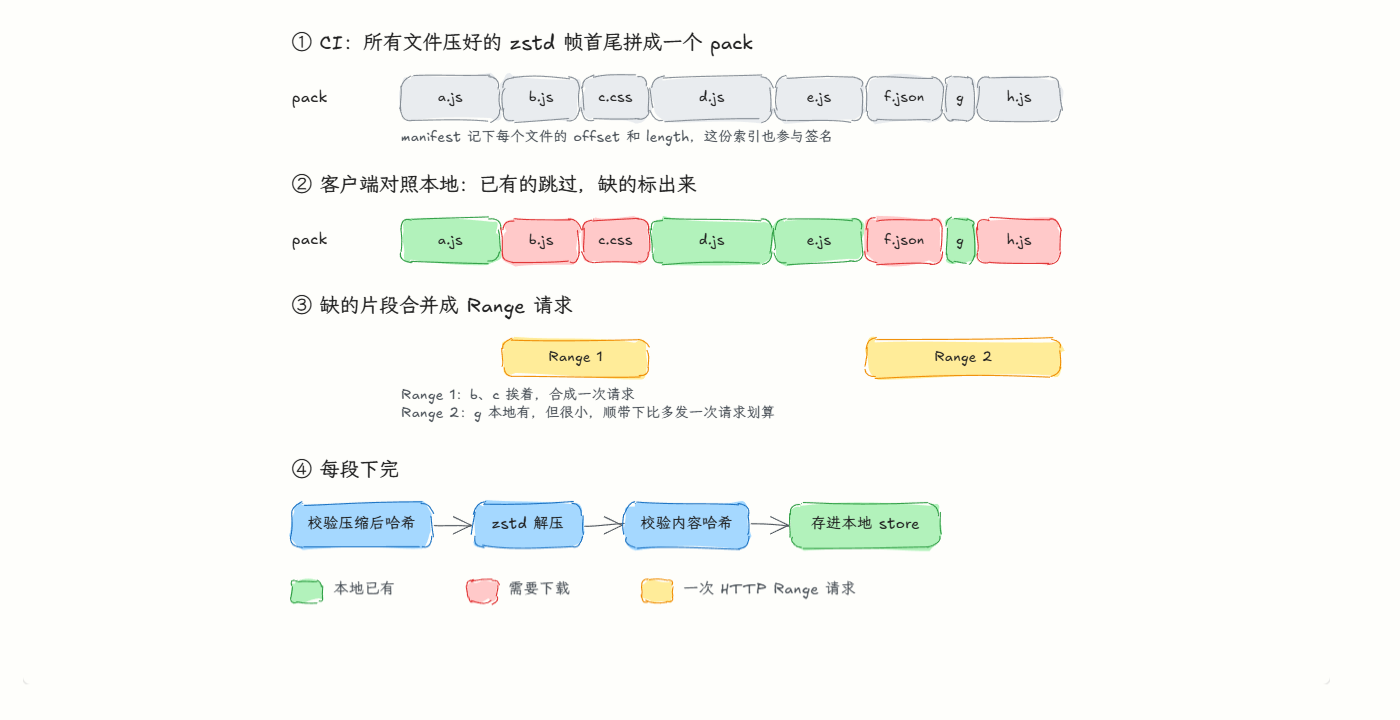
The 400 cap is gone too. Whether to download segments or the full package is now chosen by estimated time: estimated time ≈ bytes transferred ÷ throughput + request rounds × per-request latency, and whichever option is smaller wins.
At startup, the shell looks in this order: the pending new version (staged) → the current version → the previous version → the built-in core.asar. Each candidate must pass several checks: ABI and shell match, the manifest signature is valid, the channel is the same, and the version is newer than the built-in one. A version that fails to start 3 times in a row is blacklisted, and the shell automatically falls back to the next candidate.
Loose files: measured, then decided not to change them
For problem 3 above, I originally planned to assemble the OTA versions in userData into asars too. But once I actually measured, the data told me not to.
An OTA version has roughly 1,700 files totaling 111 MB, and 40% of those files are no larger than 4 KB. But assembly happens after the background download, not on the startup path. On macOS, switching from one OTA version to the next takes 300–340 ms. On Windows, a real first-time OTA run (10.3 MB downloaded, 1,707 files assembled) took 4.19 seconds end to end.
Disk usage isn't as wasteful as you'd think either. The store and each version's directory all live under userData/core-ota. Files unchanged between versions share the same inode through hard links, so keeping one more version actually costs 0 KB extra, and we only retain current, previous, and the staged version. The only duplication is the first OTA: the whole version has to be extracted from the built-in core.asar, about 108 MB, and switching to asar wouldn't save that copy. Conversely, if each version were packed as an asar, versions couldn't share inodes, disk usage for current plus previous would nearly double, and we'd have to ship a full installer just to change the layout. So the loose files stay.
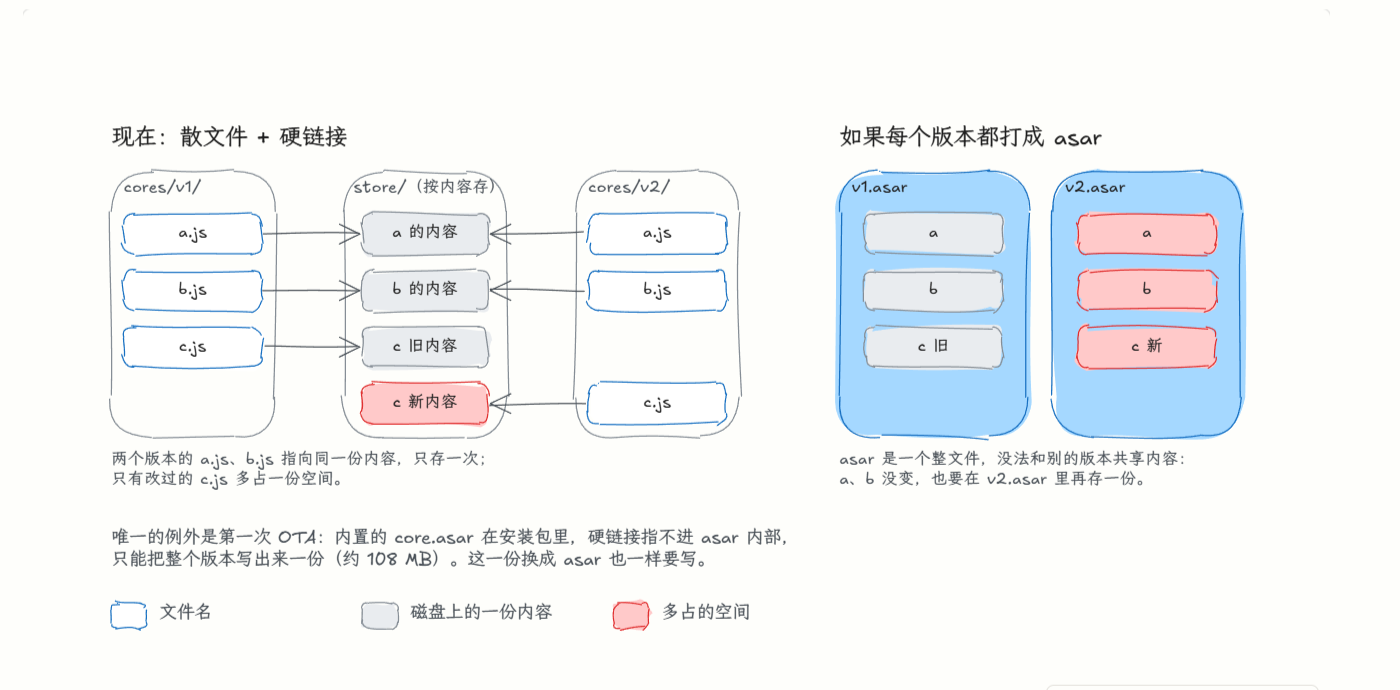
A hard link is like giving the same content on disk a second filename. On the left, cores/v1/a.js and cores/v2/a.js are two names backed by the same data in the store, so keeping an extra version only costs space for the files that actually changed. On the right, an asar is one big complete file whose contents can't be shared with other versions, so every version is a full copy.
File verification belongs only at update time
While measuring, I noticed another problem: on every launch, the shell reads every file in the current OTA version and computes a sha256, and it does this before the window appears. But the update stage had already verified them: CoreStore.assemble hashes every assembled file in a temp directory, and only once the check succeeds does it swap the directory into place and mark it staged. Doing it all again at startup is redundant.
#20211 switches the startup check to a per-file stat: it only checks that each file exists and has the right size, while the signature, shellAbi, and entry-file checks all remain in place. On the same real OTA version (1,706 files, 111 MB), here is how long resolveCore takes:
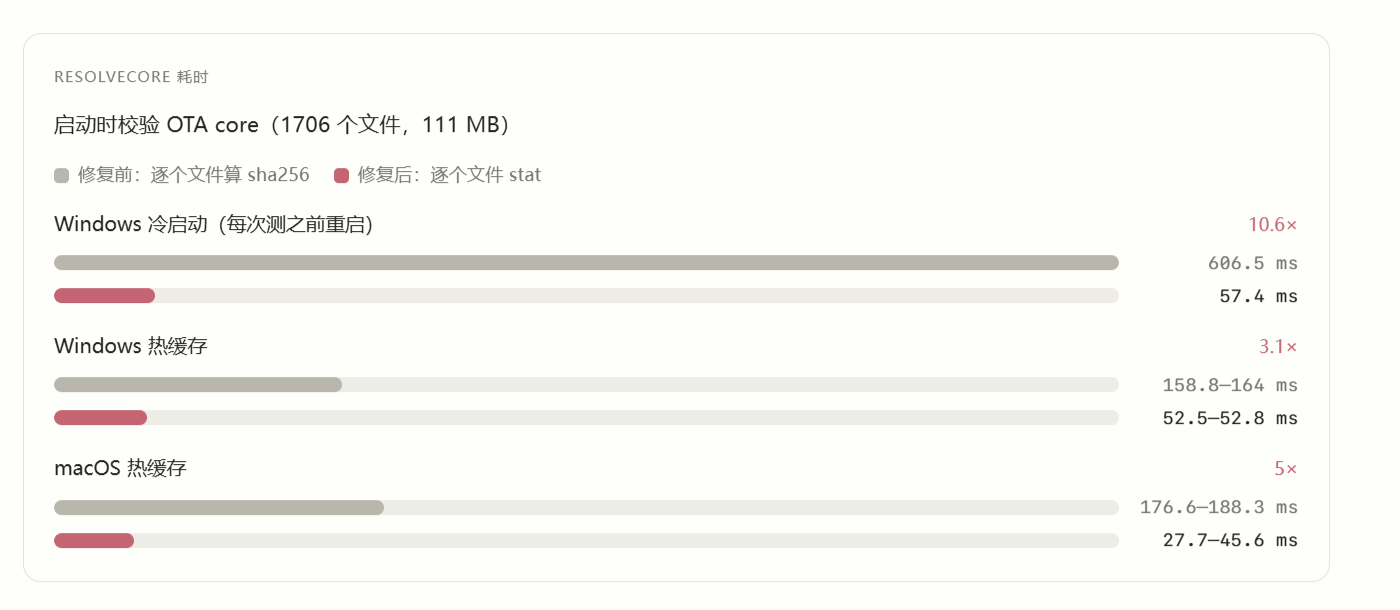
The Windows test machine is an i5-13600KF with NVMe and Defender real-time protection turned off, so it's about the best case. The macOS machine is an M4 Max. On an ordinary Windows machine with antivirus running, the numbers from before the fix would look even worse.
The trade-off: after assembly finishes, if someone modifies a file in userData locally without changing its size, startup won't catch it. Truncation, deletion, and files quarantined by antivirus are still caught. Any program that can freely write to userData has plenty of other ways to mess with the app anyway, so I'm fine with this trade-off. Also, this change touches the shell, and under the shellAbi rules that means it can only ship together with a full installer.
How much faster CI got
I pulled every successful Canary release from GitHub Actions between September 25 and 29, grouped them by the path each one took, and measured the time from the start of the first job to the end of the last:
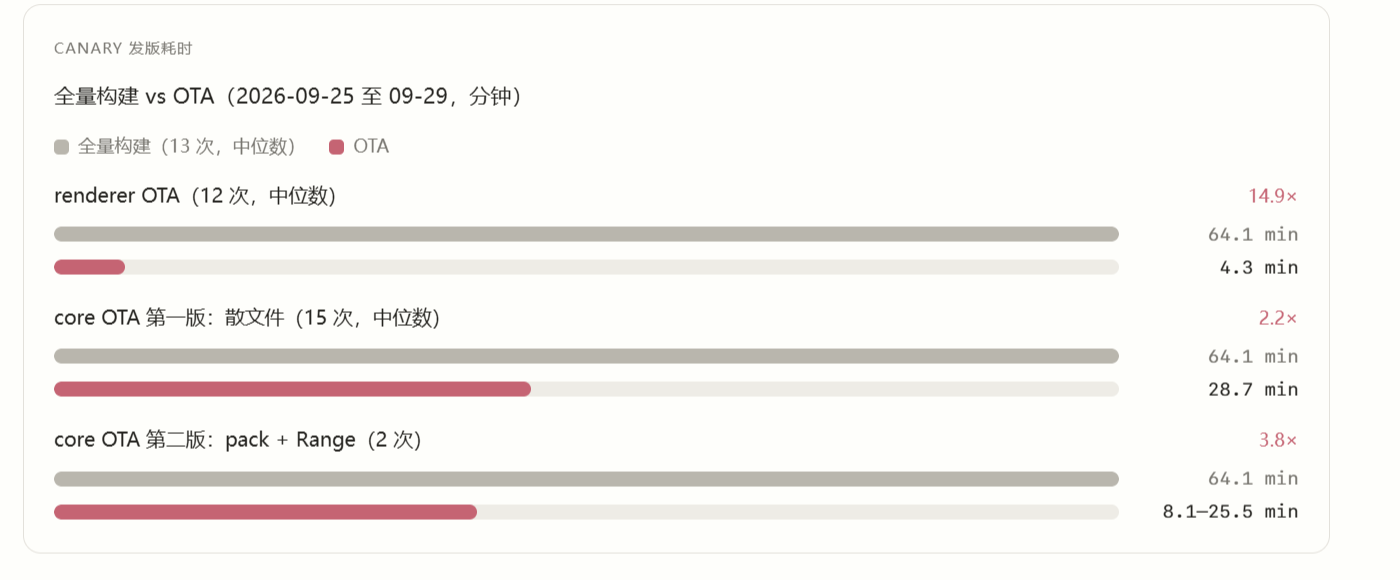
Full builds are slow because of macOS: the Apple Silicon build job takes 16–24 minutes, and since those days also included an Intel build, that job alone took 28–45 minutes, after which the macOS artifacts still had to be merged, published, and uploaded to S3. OTA builds only core; in the second version, each platform's build job takes just 3.5–5 minutes.
The whole core OTA pipeline runs much longer than any single job, and most of that time is spent waiting in the queue. Take the 12:00 run on September 29: the builds for the three platforms each needed only about 4 minutes, but they waited one after another for a runner before starting, and the whole pipeline took 25 minutes. When runners are idle, the fastest end-to-end run was 8.1 minutes.
Reload or relaunch
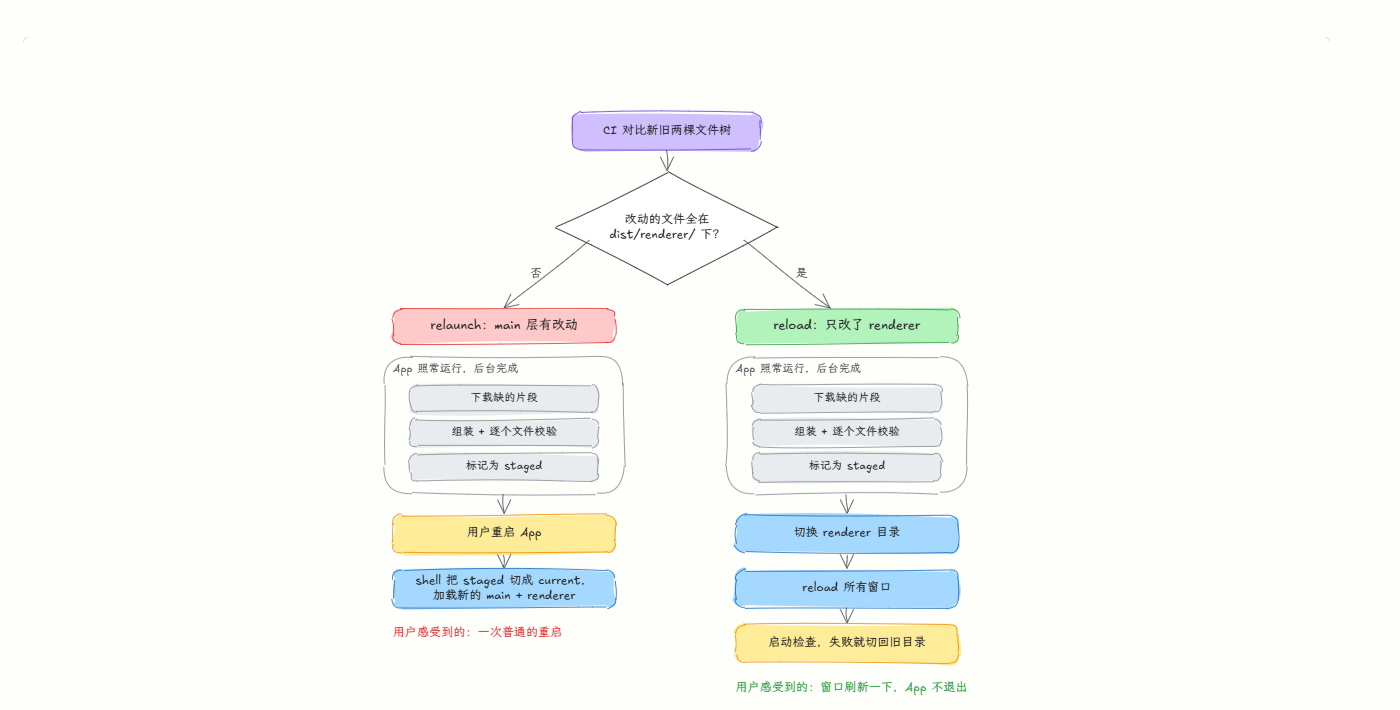
This split has another benefit: it tells you clearly whether a change touches the renderer layer or the main layer. The check is simple: CI compares the old and new file trees, and if all the changed files are under dist/renderer/, the release is marked reload; otherwise it's marked relaunch.
- Changes in the main layer: just quit and restart the app. Download, assembly, and verification were already done in the background while the app was running, so on restart the shell switches straight to the new version. It's effectively just a normal relaunch.
- Changes only in the renderer layer: the app doesn't even need to quit. Point the renderer directory at the new version and reload the window. A startup check runs after the reload, and if the new version fails to come up, it switches back to the previous directory.
Next step: replacing electron-updater with Sparkle on Stable
This OTA system currently runs only on Canary, because Canary ships very often; Stable doesn't use OTA yet. Stable still has to deal with slow full updates, and my answer is to replace electron-updater with Sparkle.
I've already opened the PR for the replacement (#19459, which first tries Sparkle delta updates on the macOS canary channel), and I'll keep working to finish it. The approach itself has already been validated:
- I previously wrote a library, electron-sparkle-updater: an N-API bridge to Sparkle.framework, plus a release toolchain for appcast generation, EdDSA signing, and delta updates.
- My own Electron app, Kansoku, has already switched to Sparkle.
- I also moved the community open-source project Lody over to Sparkle (LodyAI/Lody#173).
Looking at the real artifacts from Kansoku's last few releases, the full zip is about 120 MB, and Sparkle's delta packages are far smaller:
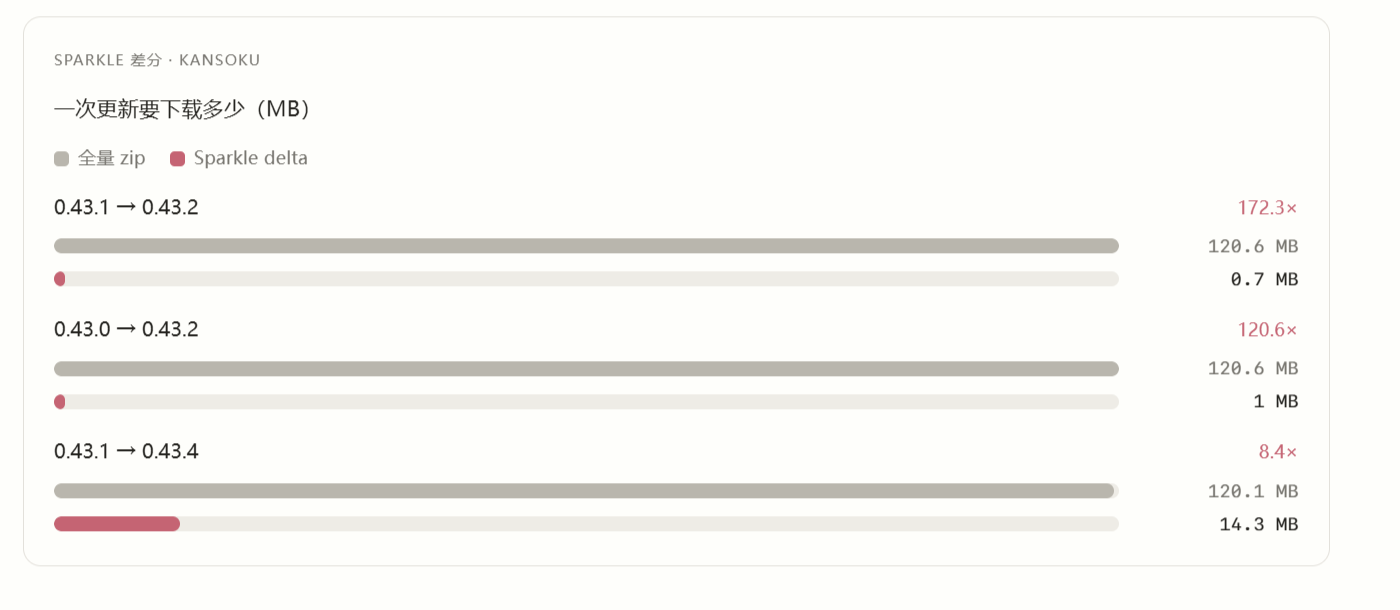
Between minor versions, deltas are only 0.7–1 MB. The one that spanned two versions with many changes was 14.3 MB, still only about an eighth of the full package. That's what I said at the start: Sparkle diffs file by file on the decompressed .app, so patch size follows the real amount of change.
Installation is much faster too. With Sparkle, the wait between the app quitting and the new version opening is a few seconds, while with electron-updater it's sometimes over ten seconds.
The enhanced Sparkle Updater I built also supports patching across multiple versions, applying patches one after another like a game patcher. In stock Sparkle, each delta can only take one specific old version straight to the latest, and a release usually generates deltas for just the last one or two versions; users several versions behind have to download the full package. My enhanced version chains together the deltas left by every past release: to go from A to E, it applies four patches in order: A→B, B→C, C→D, D→E.
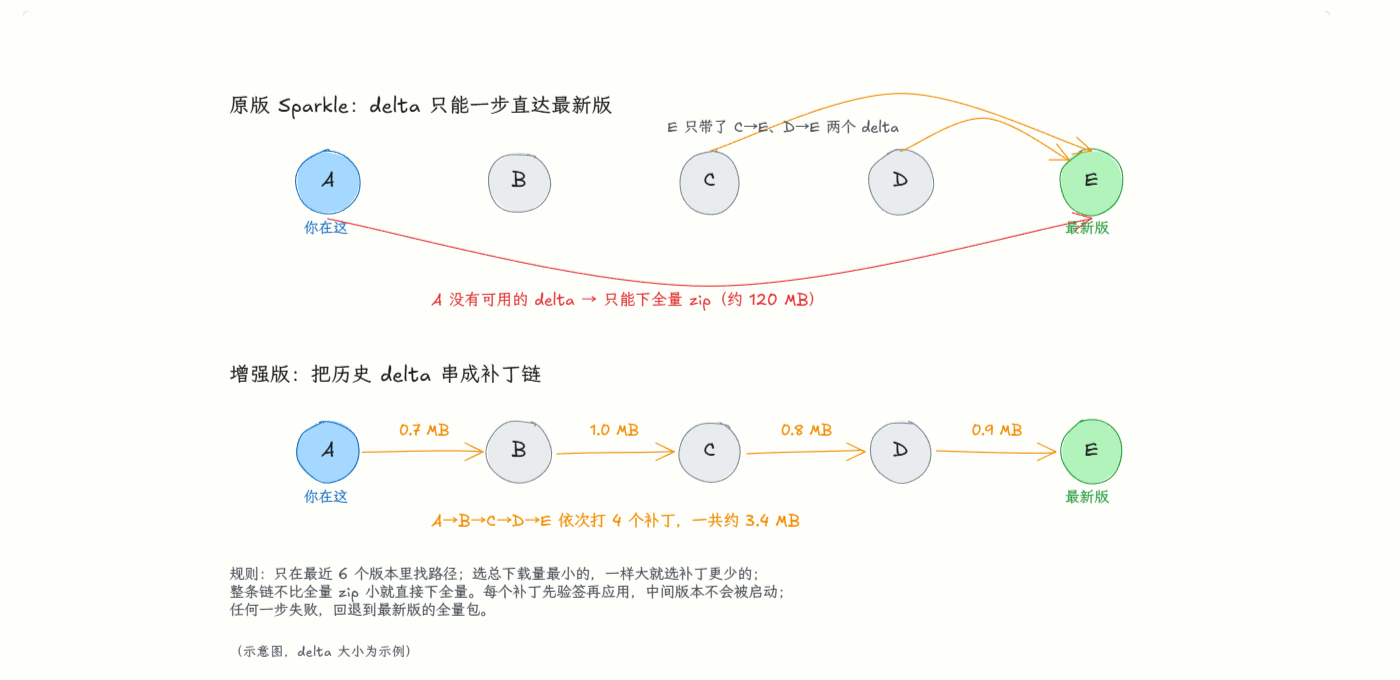
The cost of a patch chain is that every hop reads through the whole app a few times for verification. In testing, a 250 MB app takes about 0.23 seconds per hop on an M4 Max. But as long as your network is under 100 Mbps, the difference in download size far outweighs this bit of verification time: at 100 Mbps, downloading a 261 MB full package takes 24 seconds, while a 20-hop chain with 1 MB per hop takes only 8 seconds.
Sparkle only covers macOS. On Windows and Linux, electron-updater's delta updates (NSIS, AppImage) are good enough on their own, so I'm keeping them.
Original author: Innei. Published September 29, 2026: Chinese original,This article is for self-learning purposes。
Discussion
Support the author