Learn how prefetch, preconnect, and preload improve page-loading performance and user experience, including what each mechanism does and when to use it.
Introduction
Resource hints are HTML elements that help a browser load a page faster.
They use elements such as
<link>and<script>to tell the browser about resources in advance.Used correctly, they improve loading speed and user experience: preload fetches and caches critical resources, preconnect establishes early connections to external origins, and prefetch retrieves resources that may be needed later.
Why Resource Hints Matter
Modern browsers use many techniques to improve overall performance, from prioritizing important resources to predicting which page a user may visit next.
As a developer, however, you should not depend on the browser alone. You need to know which resources matter most and how to improve overall performance, perceived speed, and user experience. Resource hints often help the browser load your page sooner.
You also need to understand the best way to use each one.
How a Browser Works
To understand resource hints and where they apply, we first need a simplified picture of how a browser works.
[!TIP]
The following explanation is intentionally simplified. For more detail, read Populating the page: how browsers work.
Page loading can be reduced to three phases:
- Establish a connection.
- Download, parse, and render.
- Make the page interactive.
In the first phase, the browser connects to the server so it can download resources. This involves looking up the domain, resolving it to an IP address, opening a connection, and encrypting that connection for security.
In the second phase, the browser downloads and parses resources, builds the Document Object Model (DOM) and CSS Object Model (CSSOM), and renders the content.
The third phase makes the page interactive. The processes above run on the main thread. After parsing, rendering, and painting, the browser handles deferred JavaScript so the page can respond to scrolling, touch, and other interactions.
That is an intentionally simplified view of what happens behind the scenes; real browser implementations are much more complex.
The following sections show how resource hints can help during each phase.
Resource Hints: Prefetch, Preconnect, and Preload
As the name suggests, a resource hint tells the browser how it should handle a particular resource or page. These instructions help the browser prioritize origins and resources that need to be fetched and rendered.
Resource hints use the
relattribute of alinkelement in the document head.Adding these snippets lets the browser begin loading selected files earlier than it would discover them during normal page loading.
Put simply, you manually indicate which resources should receive priority.
prefetch
prefetchis a low-priority resource hint that lets the browser fetch a resource that may be needed later and store it in its cache.
Diagram:
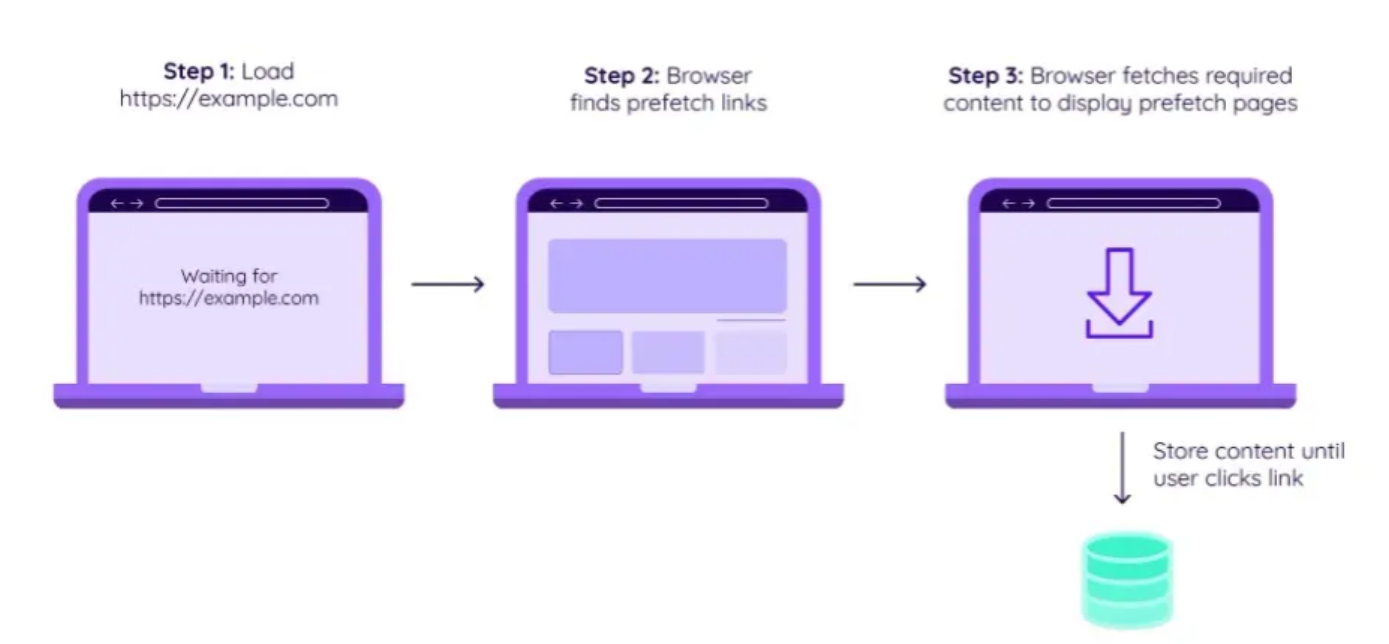
Example:
<link rel="prefetch" href="next.html" />One important warning:
[!CAUTION]
Because
prefetchhas very low priority, do not use it for important files.
A good use case:
Use prefetch to shorten the loading time of a later page.
For example, apply it while a user is authenticating. The time they spend entering credentials can be used to prefetch resources needed by the next page.
Predicting a visitor's next step and prefetching its resources can improve metrics such as First Contentful Paint and Time to Interactive. Netflix used this approach to reduce time to interactive by 30%.
Everything so far describes link prefetching, but two related forms are also important.
dns-prefetch
Before connecting to an origin server, a browser performs a DNS lookup to turn a hostname into an IP address.
This usually takes only milliseconds, but most sites load files from third-party domains, and the browser needs a lookup for every domain. A news site using many external resources may require dozens on each page.
In such cases,
dns-prefetchcan save time by telling the browser to begin immediately instead of discovering the need later in the load.The 2021 Web Almanac recommends combining
dns-prefetchwithpreconnectfor the best results. The next section explains why.
prerender
prerenderresembles prefetch because it optimizes content the user may navigate to next. The difference is that prerender renders an entire page rather than fetching one resource.
<link rel="prerender" href="blog.html" />preconnect
Like
dns-prefetch,preconnecthelps the browser establish an early connection before sending its initial request.It goes further, however. In addition to DNS lookup, it performs TLS negotiation and the TCP handshake, eliminating round trips and saving more time.
Diagram:
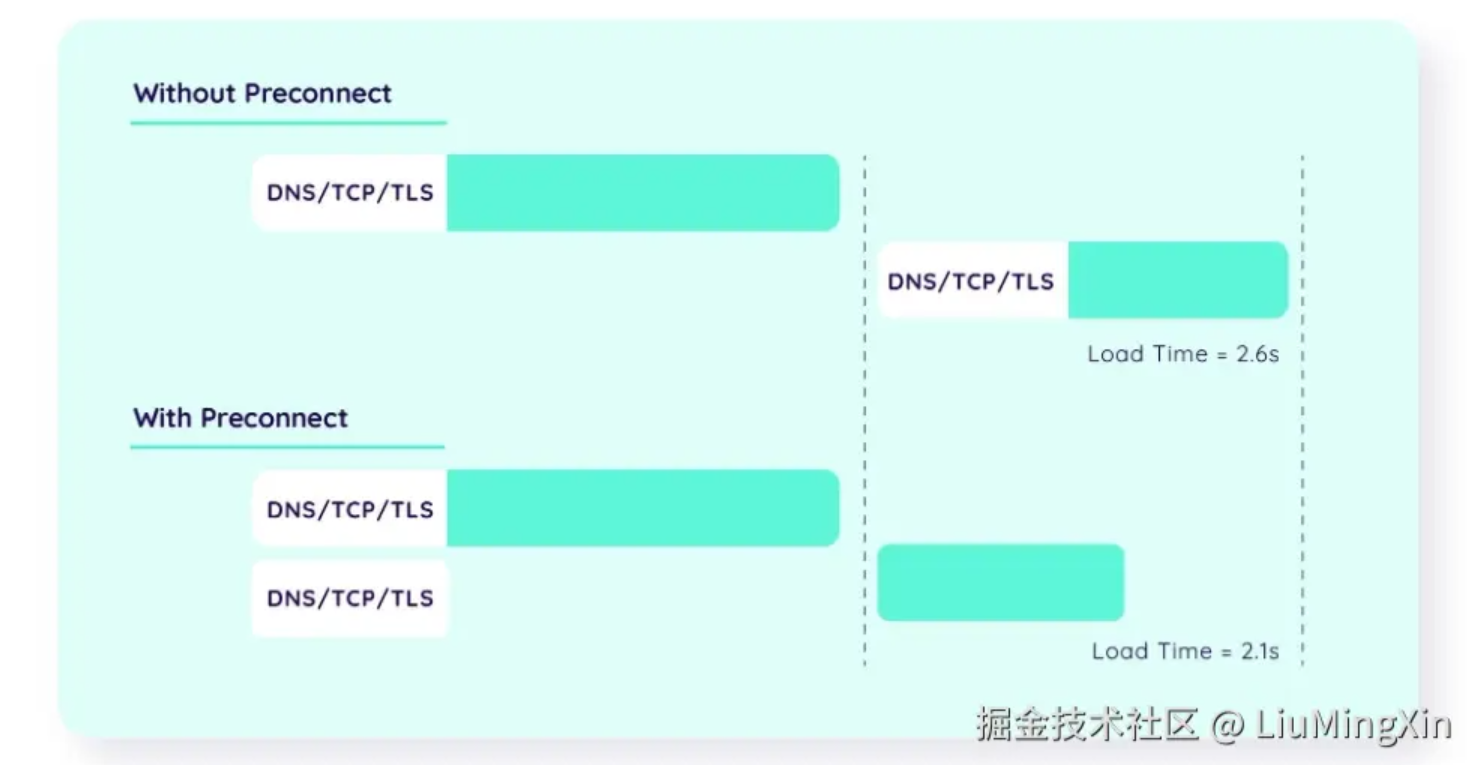
If preconnect does everything dns-prefetch does and more, why not always use it?
The answer is compatibility: some browser versions do not support
preconnect.
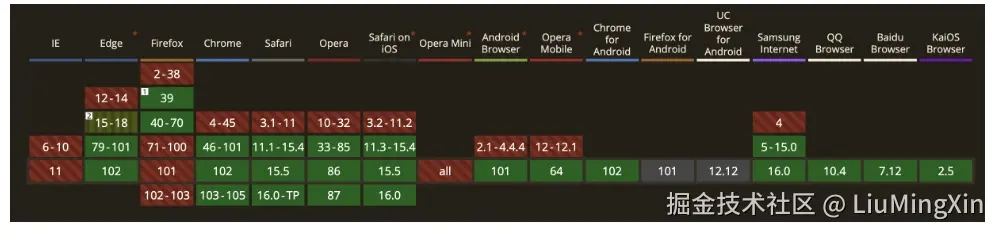
The solution is to use both:
<!-- Benefit from preconnect where supported and fall back to dns-prefetch. -->
<link rel="preconnect" href="https://example.com" />
<link rel="dns-prefetch" href="https://example.com" />
Google describes the benefit this way:
“You can speed up the load time by 100–500 ms by establishing early connections to important third-party origins. These numbers might seem small, but they make a difference in how users perceive web page performance.”
preload
Before explaining how preload works, one distinction matters:
Although preload is often called a resource hint, that is not strictly accurate. It is a declarative fetch that the browser must perform, making it closer to a command than a hint.
Preload forces the browser to download a critical resource before it would otherwise discover it.
It works best for resources on the critical rendering path that are difficult for the browser to discover, such as fonts, CSS, or critical JavaScript.
Important:
Unlike dns-prefetch and preconnect, which need only rel and href, preload also requires an as attribute indicating the resource's content type.
<link rel="preload" as="image" href="header-logo.svg" />Google warns:
“If you don’t supply a valid
aswhen specifying what to preload, for example, scripts, you will end up fetching twice.”
The complete list of supported as values is shown below:
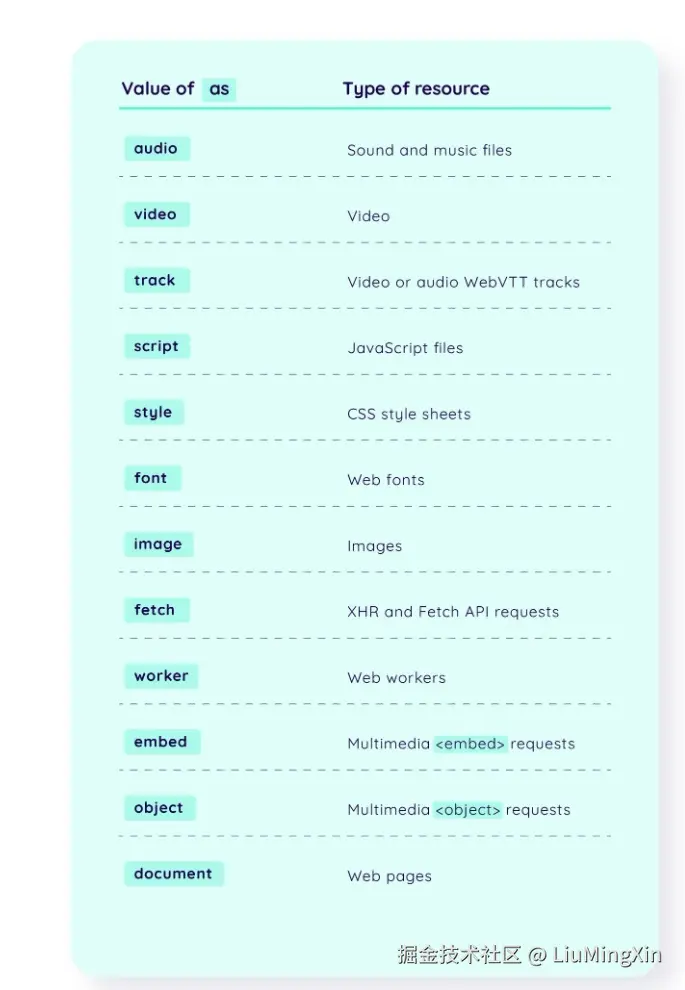
Including as helps the browser assign priority based on resource type and determine whether the resource already exists in the cache.
Some resources, including fonts, also require crossorigin.
crossoriginchanges the request mode to HTTP CORS. Cross-Origin Resource Sharing lets a server tell the browser which origins may load its resources. That topic is outside this article, but MDN explains it in detail.Like omitting
as, preloading a font without the appropriatecrossorigincan cause it to be fetched twice.
Potential Problems with Resource Hints
- Prefetch may increase data usage.
- Prerender may waste bandwidth.
- Preconnect may cause extra CPU usage.
- Preload may override priorities chosen by the browser's parser.
Related Script Loading: async and defer
The resource hints above all begin work early. JavaScript also provides two attributes for changing when work occurs: async and defer.
async
asyncrequests the script asynchronously.When the browser encounters an
asyncscript, the network request does not block HTML parsing. If the script arrives before the HTML is fully parsed, however, the browser pauses parsing, executes the JavaScript, and then continues.
<script src="http://xxxx.com/xxx.js" async></script>
In the ideal case, HTML parsing finishes before the script request returns, so the downloaded script executes immediately afterward.

defer
deferdelays execution.The script is still fetched asynchronously and does not block HTML parsing. If it arrives before parsing finishes, the browser does not pause to execute it; execution waits until the HTML has been completely parsed.
<script src="http://xxxx.com/xxx.js" defer></script>
Summary
The main difference is whether execution can interrupt HTML parsing: async may interrupt it, while defer waits until parsing is complete.
| Script element | JavaScript execution order | Blocks HTML parsing? |
|---|---|---|
script | Document order | Yes |
script async | Network completion order | Possibly |
script defer | Document order | No |
Reference:
https://www.growingwiththeweb.com/2014/02/async-vs-defer-attributes.html
Discussion
Support the author