OpenAI 官方图像提示指南中文版,介绍模型选择、提示词编写、图像生成与编辑、跨轮次细化,以及保持主体和细节一致性的实用方法。
页边批注为本站的阅读理解与实践补充,不属于原文。
本文翻译自 OpenAI 官方文档。模型、参数和价格可能随官方文档更新,请以原文为准。
概述
从您需要的图像开始,然后描述主题、构图、风格和约束。对于编辑,确定哪些内容应该更改,哪些内容必须保持不变。一次改进一件事并检查结果。
GPT Image 2.5 包括两种型号选择。 GPT Image 2.5 Flare 是小型模型,针对速度进行了优化,图像质量与 GPT Image 2 相当。 GPT Image 2.5 Sunburst 是基础型号,针对质量进行了优化,图像质量比 GPT Image 2 更高。两种模型都在精确编辑和主题保存方面都有改进。
有关 API 设置和请求示例,请参阅图像生成指南。
选择模型
对于新的工作流程,当优先考虑速度时,从 GPT Image 2.5 Flare 开始;当优先考虑严格的质量要求时,从 GPT Image 2.5 Sunburst 开始。一旦输出满足您的要求,就寻找减少延迟的机会。
要从当前图像模型迁移,请使用当前图像质量作为起点。两种模型都支持图像生成、编辑和透明背景。
| 您当前的工作流程 | 从测试开始 |
|---|---|
| 现有的、经过验证的 GPT Image 2 工作流程已经满足您的质量要求 | GPT Image 2.5 Flare。检查是否可以在减少延迟的同时保持可接受的质量。 |
| GPT Image 2 不满足您的质量要求的复杂用例 | GPT Image 2.5 Sunburst。首先确定它提供您所需的质量。 |
如果 GPT Image 2.5 Sunburst 满足您的质量要求,则使用相同的提示和输入测试 GPT Image 2.5 Flare。如果 GPT Image 2.5 Flare 也满足这些要求并改善延迟,请切换到它。当您的工作流程需要 GPT Image 2.5 Sunburst 的质量优势时,请保留 GPT Image 2.5 Sunburst。
测量您自己的工作负载的响应时间和质量。结果取决于您的提示、参考图像、输出尺寸和质量设置;一项工作负载的速度改进并不会对另一工作负载产生固定的改进。
模型参数
与提示分开设置 API 参数。
| 模型参数 | GPT Image 2.5 设置 |
|---|---|
model | gpt-image-2.5-flare(小型模型)或 gpt-image-2.5-sunburst(基础模型) |
quality | auto(默认)、low、medium、high、xhigh 或 max |
size | auto 或自定义分辨率。常见尺寸:1024x1024(方形)、1536x1024(横向)、1024x1536(纵向)、2048x2048(2K 方形)、2048x1152(2K 横向)、3840x2160(4K 横向)和 2160x3840(4K 纵向)。 |
background | auto、opaque 或 transparent |
对于自定义分辨率,请使用 WIDTHxHEIGHT 并遵循以下限制:
- 每条边不得超过 3,840 像素。
- 两条边都必须是 16 像素的倍数。
- 长边与短边之比不得超过 3:1。
- 总像素数必须介于 655,360 和 8,294,400 之间。
总像素超过 3,686,400 的输出 (2560x1440) 是实验性的。
在调整 quality 之前,使用上述工作流程选择模型。对于第一次比较,当两个模型都支持时,保持明确选择的质量设置不变,以及提示、参考图像和输出尺寸。相同的质量标签并不意味着模型之间具有相同的图像质量或响应时间。
如果输出不足,请测试更高的质量设置。一旦满足您的要求,请测试较低的设置,看看它们是否在减少延迟的同时保持可接受的质量。仅当 xhigh 或 max 在您的延迟预算内改善了未满足的质量要求时才使用它们。较高的设置并不能保证每个提示都有更好的结果。
对于透明资源,明确请求 background="transparent" 并使用 PNG 或 WebP。检查解码图像的 Alpha 通道,包括头发、玻璃、阴影和对象边缘。 output_compression 仅适用于 JPEG 或 WebP 输出,不适用于 PNG。
迁移现有工作流程
- 保存基线。 收集代表性的生产提示和参考图像,包括困难的编辑、精确的文本、面孔、产品几何形状和透明资源。记录当前模型、请求设置和结果。
- 选择第一个候选。 如果 GPT Image 2 已满足您的质量要求,请从 GPT Image 2.5 Flare 开始并测试延迟改进。如果 GPT Image 2 无法满足复杂的用例,请从 GPT Image 2.5 Sunburst 开始,并首先确定它满足您的质量要求。第一次比较时保持提示、参考、尺寸和输出格式不变。
- 检查完整结果。 比较说明遵循、身份和产品保存、文本准确性、不需要的更改和透明度。重复请求以衡量一致性。对于编辑工作流程,测试完整的编辑序列以及各个步骤。
- 质量通过后测试延迟增益。 如果您开始使用 GPT Image 2.5 Sunburst 并且它满足您的质量要求,请根据相同的要求评估 GPT Image 2.5 Flare。仅在质量保持可接受且延迟改善时才进行切换;否则,保留 GPT Image 2.5 Sunburst。
- 一次调整一项设置。 在重写提示之前比较质量级别。测量典型和缓慢的响应、失败、重试以及每个接受图像的成本。确认当前定价,而不是假设速度更快的模型成本更低。
- 按工作流程推出。 一旦发布的模型通过您的验收标准,移动一小部分流量,监控相同的措施,并逐渐扩展。在仍受支持的情况下,使先前的模型可用于回滚。
从 GPT Image 1 或 1.5 迁移时,请使用参考选项卡检查参数差异和关闭日期。测试候选模型支持的请求设置,而不是原封不动地复制旧设置。对于 GPT Image 2,在比较中保留您现有的分辨率和透明度要求。
重复编辑仍然可以更改您想要保留的细节。重申这些约束并检查每个结果。如果某个区域必须保持像素相同,请将批准的编辑合成到原始图像中,而不是单独依赖提示。
提示基础知识
- 定义结果。 命名主题和预期用途,例如产品照片、广告或图表。指定构图、长宽比和重要的放置限制。对于复杂的请求,请使用带标签的部分将提示组织为场景、主题、细节和约束。
- 选择可维护的格式。 简短的提示、描述性段落、类似 JSON 的结构、指令和标签都可以表达相同的意图。选择使需求最容易阅读和更新的格式,而不是依赖特殊语法。
- 描述可见的细节。 命名材料、灯光、颜色和视觉媒介。当目标是“真实照片”或“真实照片”时,明确要求,并描述框架和纹理。将相机规格视为外观提示,而不是精确物理模拟的保证。对于宽阔、电影、低光、雨天或霓虹灯场景,指定比例、氛围和颜色,而不是仅仅依赖情绪词。
- 指定人物和动作。 描述身体框架、相对比例、凝视以及与物体的互动。诸如“全身可见,包括脚”、“低头看着打开的书”或“双手自然地握住车把”等指令使预期的姿势和动作更加清晰。
- 指定准确的文本。 将所需的措辞放在引号中,并描述其位置和排版。需要时逐字母拼写不常见的单词或品牌名称。要求不要提供额外的文本,然后检查输出中的拼写和易读性。比较小文本、密集信息或多种字体的中等或高质量。
- 将更改与约束分开。 对于编辑,请说“仅更改 X”并列出要保留的详细信息,例如身份、几何形状、布局、照明或标签。注明排除项,例如不需要的文本、徽标或水印。为了进行精确的局部编辑,还可以识别必须保持不变的饱和度、对比度、箭头、相机角度和周围对象。
- 为参考分配角色。 按编号和目的识别每个输入:主题、风格、服装或背景。解释输入应该如何组合以及哪些元素应该移动到哪里。
- 故意迭代。 将前一个输出作为下一个编辑输入,请求一项更改,并重复要保留的详细信息。诸如“与以前相同的风格”之类的引用可以携带上下文,但如果结果发生变化,则重申关键约束。在添加更多指令之前比较结果。
下面的每个示例都演示了一种不同的技术。将他们的提示作为起点,并根据您自己的形象和要求进行调整。
生成图像
控制风格和照明
通过主题、取景、光线和纹理描述照片。此示例指定了坦率的构图并明确排除了大量修饰。
生成设置:size="1024x1536"、quality="medium"。
Create a photorealistic candid photograph of an elderly sailor standing on a small fishing boat.
He has weathered skin with visible wrinkles, pores, and sun texture, and a few faded traditional sailor tattoos on his arms.
He is calmly adjusting a net while his dog sits nearby on the deck. Shot like a 35mm film photograph, medium close-up at eye level, using a 50mm lens.
Soft coastal daylight, shallow depth of field, subtle film grain, natural color balance.
The image should feel honest and unposed, with real skin texture, worn materials, and everyday detail. No glamorization, no heavy retouching.
示例输出:
GPT Image 2.5 Flare

GPT Image 2.5 Sunburst

直观地解释流程
命名流程、受众以及图像应传达的信息。对于图表和信息图形,验证标签和事实关系以及外观。
生成设置:size="1024x1536"、quality="medium"。
Create a detailed Infographic of the functioning and flow of an automatic coffee machine like a Jura.
From bean basket, to grinding, to scale, water tank, boiler, etc.
I'd like to understand technically and visually the flow.
输出示例:
GPT Image 2.5 Flare

GPT Image 2.5 Sunburst

渲染精确文本
引用所需的副本并告诉模型它应该出现多少次。指定观众和视觉处理,无需添加无关的说明。
生成设置:size="1024x1536"、quality="medium"。
Give me a cool in culture ad / fashion shot for a brand called Thread.
It's a hip young street brand. The ad shows a group of friends hanging out together with the tagline "Yours to Create."
Make it feel like a polished campaign image for a youth streetwear audience: stylish, contemporary, energetic, and tasteful.
Use clean composition, strong color direction, natural poses, and premium fashion photography cues.
Render the tagline exactly once, clearly and legibly, integrated into the ad layout.
No extra text, no watermarks, no unrelated logos.
示例输出:
GPT Image 2.5 Flare

GPT Image 2.5 Sunburst

设计可复用的徽标
描述应定义标记的品牌和形状。指定在不同尺寸下仍清晰可见的清晰构图。使用 n 请求多个变体。
生成设置:size="1024x1536"、quality="medium"、background="transparent"、output_format="png"、n=1。
Create an original, non-infringing logo for a company called Field & Flour, a local bakery.
The logo should feel warm, simple, and timeless. Use clean, vector-like shapes, a strong silhouette, and balanced negative space.
Favor simplicity over detail so it reads clearly at small and large sizes. Flat design, minimal strokes, no gradients unless essential.
Fully transparent background. Deliver a single centered logo with generous padding, clean alpha edges, and no solid backdrop, scenery, checkerboard, or watermark.
每一行都比较每个模型的一个变体。
输出示例:
GPT Image 2.5 Flare

GPT Image 2.5 Sunburst

GPT Image 2.5 Flare

GPT Image 2.5 Sunburst

GPT Image 2.5 Flare

GPT Image 2.5 Sunburst

GPT Image 2.5 Flare

GPT Image 2.5 Sunburst

使用历史与现实世界背景知识
命名地点和日期以建立历史设置。该模型可以推断上下文细节,但可以检查服装、舞台和周围环境的历史准确性。
生成设置:size="1024x1536"、quality="medium"。
Create a realistic outdoor crowd scene in Bethel, New York on August 16, 1969.
Photorealistic, period-accurate clothing, staging, and environment.
输出示例:
GPT Image 2.5 Flare

GPT Image 2.5 Sunburst

将故事变成漫画
对于故事到漫画的生成,将叙事定义为一系列清晰的视觉节拍,每个面板一个。保持描述具体且以行动为中心,以便模型可以将故事转化为可读的、节奏良好的面板。
生成设置:size="1024x1536"、quality="medium"。
Create a short vertical comic-style reel with 4 panels.
Panel 1: The owner leaves through the front door. The pet is framed in the window behind them, small against the glass, eyes wide, paws pressed high, the house suddenly quiet.
Panel 2: The door clicks shut. Silence breaks. The pet slowly turns toward the empty house, posture shifting, eyes sharp with possibility.
Panel 3: The house transformed. The pet sprawls across the couch like it owns the place, crumbs nearby, sunlight cutting across the room like a spotlight.
Panel 4: The door opens. The pet is seated perfectly by the entrance, alert and composed, as if nothing happened.
输出示例:
GPT Image 2.5 Flare

GPT Image 2.5 Sunburst

创建界面预览
当您描述产品时界面预览效果最佳,就像它已经存在一样。专注于布局、层次结构、间距和真实的界面元素,并避免概念艺术语言,使结果看起来像一个可用的、已交付的界面,而不是设计草图。
生成设置:size="1024x1536"、quality="medium"。
Create a realistic mobile app UI mockup for a local farmers market.
Show today’s market with a simple header, a short list of vendors with small photos and categories, a small “Today’s specials” section, and basic information for location and hours.
Design it to be practical, and easy to use. White background, subtle natural accent colors, clear typography, and minimal decoration.
It should look like a real, well-designed, beautiful app for a small local market.
Place the UI mockup in an iPhone frame.
示例输出:
GPT Image 2.5 Flare

GPT Image 2.5 Sunburst

创建科学和教育视觉效果
科学和教育视觉效果非常适合生物学、化学、课堂讲解、平面科学图标系统、图表和学习资源。像教学设计概要一样提示他们:定义受众、课程目标、视觉格式、所需标签和科学约束。为了获得最佳结果,要求一个干净、平坦的视觉系统,具有一致的图标样式、清晰的箭头、可读的标签以及足够的空白空间,以便学生快速浏览概念。
当准确性很重要时,明确列出所需的组件并说明不应包含哪些组件。使用 quality="high" 用于幻灯片或课程材料中使用的密集标签、图表或资源。
生成设置:size="1536x1024"、quality="high"。
Create a simple biology diagram titled "Cellular Respiration at a Glance" for high school students.

Show how glucose turns into energy inside a cell. Include glycolysis, the Krebs cycle, and the electron transport chain.
Use arrows to connect the steps, and label the main molecules: glucose, pyruvate, ATP, NADH, FADH2, CO2, O2, and H2O.
Make it look like a clean classroom handout or slide, with a white background, simple icons, clear labels, and easy-to-read text.

Avoid tiny text, extra decoration, or anything that makes the diagram hard to understand.
示例输出:
GPT Image 2.5 Flare

GPT Image 2.5 Sunburst

制作幻灯片、示意图和图表
当提示词更像一份成果规格、而不是单纯的插图请求时,生产力类视觉内容的效果最好。请明确具体的交付物(幻灯片、流程图、图表或页面图像),定义画布与信息层级,提供真实文本或数据,并描述视觉语言。这类提示还应包含实际约束:排版清晰、间距精致、装饰不过度,并避免千篇一律的图库照片风格。
对于幻灯片、图表和大量图表资源,请直接在提示中包含数字和标签。当图像包含小文本、图例、轴或脚注时,请使用横向尺寸进行甲板式输出和 quality="high"。
下面的市场数据和引用仅是虚构的设计输入。正式使用幻灯片前,请将其替换为经过验证的数据。
生成设置:size="1536x864"、quality="high"。
Create one pitch-deck slide titled **"Market Opportunity"** that feels like a real Series A fundraising slide from a YC-backed startup.

Use a clean white background, modern sans-serif typography like Inter, and a crisp, minimal layout. The slide should include:

* A TAM/SAM/SOM concentric-circle diagram in muted blues and grays
* Specific, believable market sizing numbers:

  * **TAM:** $42B
  * **SAM:** $8.7B
  * **SOM:** $340M
* A clean bar chart below showing market growth from **2021 to 2026**, with a subtle upward trend
* Small footnotes: **"AGI Research, 2024"** and **"Internal analysis"**
* A company logo placeholder in the bottom-right corner

The design should look like it belongs in a deck that actually raised money: highly readable text, clear data hierarchy, polished spacing, and professional startup-style visual language.

Avoid clip art, stock photography, gradients, shadows, decorative elements, or anything that feels generic or overdesigned.
示例输出:
GPT Image 2.5 Flare

GPT Image 2.5 Sunburst

编辑图像
将 client.images.edit 与引用的输入图像一起使用。对于需要遮罩的本地编辑,请参阅使用遮罩编辑。
翻译,同时保留布局
使用直观地解释流程中各模型生成的咖啡机图作为输入。要求替换其中的文字,同时保持设计不变;随后检查译文,并确认没有残留原语言文本。
编辑设置:size="1024x1536"、quality="high"。
Translate the text in the infographic to Spanish. Do not change any other aspect of the image.示例输出:
GPT Image 2.5 Flare

GPT Image 2.5 Sunburst

迁移视觉风格
为参考图像分配特定角色:其调色板、纹理或视觉媒介。单独描述新主题。使用下面的像素艺术图像作为输入。
编辑设置:size="1024x1536"、quality="medium"。
Use the same style from the input image and generate a man riding a motorcycle on a white background.输入图像:

示例输出:
GPT Image 2.5 Flare

GPT Image 2.5 Sunburst

保留身份并更换服装
使用人物照片和三张下面的服装参考作为输入。说明人的哪些方面必须保持不变,并且只允许改变服装。此模式也适用于产品或对象必须保持可识别性的编辑。
编辑设置:size="1024x1536"、quality="medium"。
Edit the image to dress the woman using the provided clothing images. Do not change her face, facial features, skin tone, body shape, pose, or identity in any way. Preserve her exact likeness, expression, hairstyle, and proportions. Replace only the clothing, fitting the garments naturally to her existing pose and body geometry with realistic fabric behavior. Match lighting, shadows, and color temperature to the original photo so the outfit integrates photorealistically, without looking pasted on. Do not change the background, camera angle, framing, or image quality, and do not add accessories, text, logos, or watermarks.输入图像:


输出示例:
GPT Image 2.5 Flare

GPT Image 2.5 Sunburst

组合参考图
将场景照片作为图像 1 传递,将狗照片作为图像 2 传递。指定要移动的元素、其目的地以及必须保持不变的元素。
编辑设置:size="1024x1536"、quality="medium"。
Place the dog from the second image into the setting of image 1, right next to the woman, use the same style of lighting, composition and background. Do not change anything else.输入图像:


示例输出:
GPT Image 2.5 Flare

GPT Image 2.5 Sunburst

创建透明背景的产品抠图
请求提示中的独立主题和 API 中的 background="transparent"。使用 PNG 或 WebP,保留返回的 Alpha 通道,并省略 PNG 的 output_compression。绘制的棋盘不是透明的。对于后续编辑,重复保留透明背景的要求。使用下面的产品照片作为输入。
编辑设置:size="1024x1536"、quality="medium"、background="transparent"、output_format="png"。
Extract the product from the input image and isolate it on a fully transparent background.
Output: centered product, crisp silhouette, no halos/fringing.
Preserve product geometry and label legibility exactly.
Add only light polishing. Do not add a solid backdrop, checkerboard, scenery, or shadow.
Do not restyle the product; remove the background and preserve clean alpha transparency.
输入图像:

示例输出:
GPT Image 2.5 Flare

GPT Image 2.5 Sunburst

将绘图转换为逼真的图像
草图到渲染工作流程非常适合将粗略的绘图转换为逼真的概念,同时保持原始意图。将提示视为规范:保留布局和透视,然后通过指定合理的材料、照明和环境来添加真实感。包括“不添加新元素/文本”以避免创造性的重新解释。
编辑设置:size="1024x1536"、quality="medium"。
Turn this drawing into a photorealistic image.
Preserve the exact layout, proportions, and perspective.
Choose realistic materials and lighting consistent with the sketch intent.
Do not add new elements or text.
输入图像:

示例输出:
GPT Image 2.5 Flare

GPT Image 2.5 Sunburst

删除一个对象
通过命名删除一个对象它明确并保留它周围的一切。保持人物、姿势、灯光和构图不变,以便编辑保持本地化。
编辑设置:size="1024x1536"、quality="medium"。
Remove the flower from man's hand. Do not change anything else.输入图像:

输出示例:
GPT Image 2.5 Flare

GPT Image 2.5 Sunburst

将人物插入场景
将一个人插入到新场景中,同时保留其身份。指定自然光、可信的细节、身体框架、凝视以及与场景的交互。说明哪些面部特征和比例必须保持不变。对于gpt-image-2,省略input_fidelity;图像输入始终以高保真度进行处理。
使用博物馆里的女人 作为输入图像。
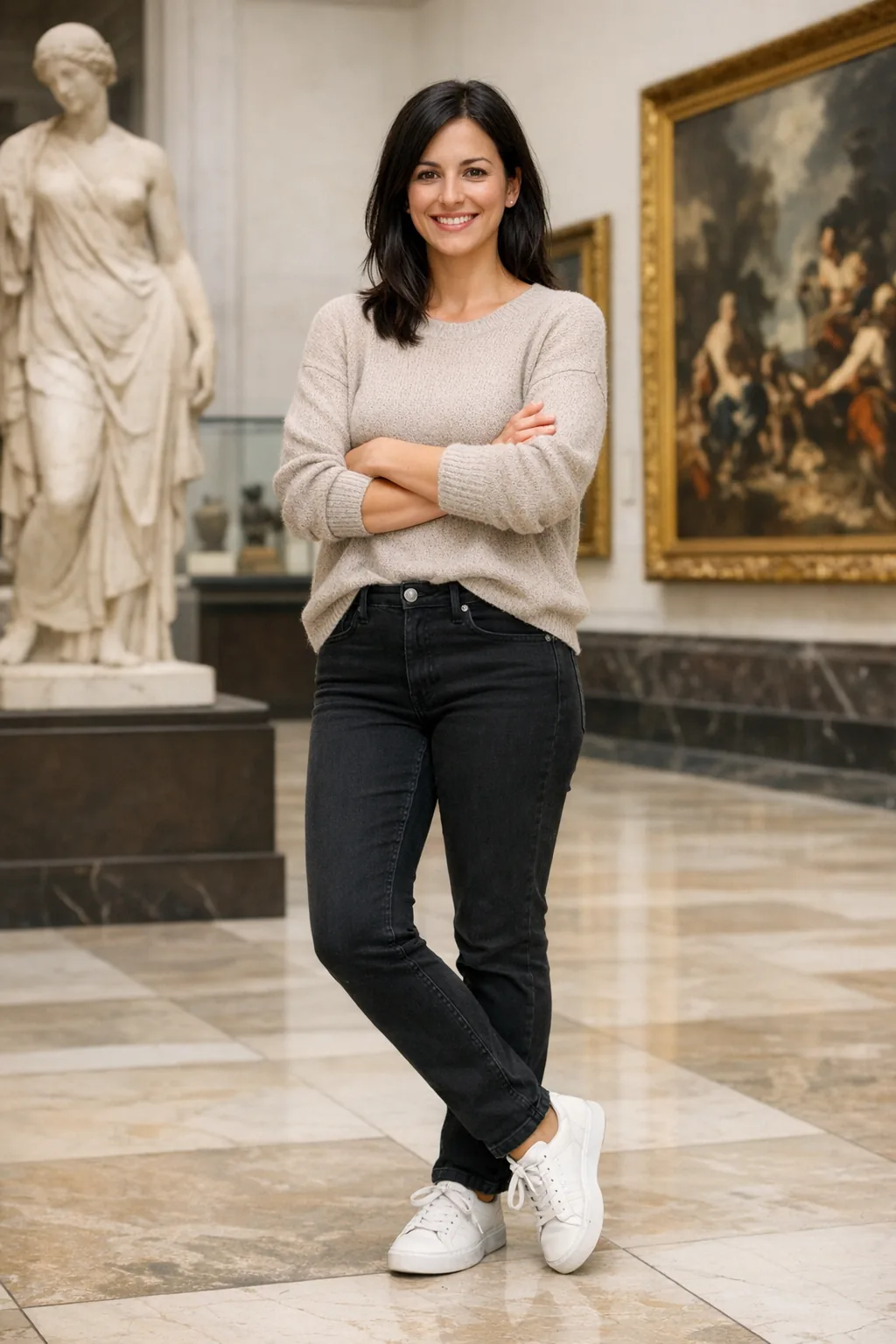
编辑设置:size="1024x1536"、quality="medium"。
Generate a highly realistic action scene where this person is running away from a large, realistic brown bear attacking a campsite. The image should look like a real photograph someone could have taken, not an overly enhanced or cinematic movie-poster image.
She is centered in the image but looking away from the camera, wearing outdoorsy camping attire, with dirt on her face and tears in her clothing. She is clearly afraid but focused on escaping, running away from the bear as it destroys the campsite behind her.
The campsite is in Yosemite National Park, with believable natural details. The time of day is dusk, with natural lighting and realistic colors. Everything should feel grounded, authentic, and unstyled, as if captured in a real moment. Avoid cinematic lighting, dramatic color grading, or stylized composition.
示例输出:
GPT Image 2.5 Flare

GPT Image 2.5 Sunburst

跨回合细化图像
从一个输出开始,检查它,并将其用作下一个输入。缩小每次跟进的范围,以便您可以看到哪些更改有所帮助。
创建起始图像
使用创建透明背景的产品抠图中的洗发水照片作为广告牌场景的输入。准确保留标签文字。
编辑设置:size="1024x1536"、quality="medium"。
Create a realistic billboard mockup of the shampoo on a highway scene during sunset.
Billboard text (EXACT, verbatim, no extra characters):
"Fresh and clean"
Typography: bold sans-serif, high contrast, centered, clean kerning.
Ensure text appears once and is perfectly legible.
No watermarks, no logos.
输入图像:
示例输出:
GPT Image 2.5 Flare

GPT Image 2.5 Sunburst

更改一个条件
将上一步中每个模型的广告牌输出传递到下一个编辑请求。这个简短的后续动作改变了天气,同时保留了现有的场景。
编辑设置:size="1024x1536"、quality="medium"。
Make it look like a winter evening with snowfall.输出示例:
GPT Image 2.5 Flare

GPT Image 2.5 Sunburst

保持角色一致
对于包含多个插图的书籍,创建可重复使用的角色参考,以帮助保留场景、姿势和页面的外观。改变环境和故事,同时重复角色的定义细节。
建立角色
定义角色的外观、比例、服装和语气。
生成设置:size="1024x1536"、quality="medium"。
Create a children’s book illustration introducing a main character.

Character:
A young, storybook-style hero inspired by a little forest outlaw,
wearing a simple green hooded tunic, soft brown boots, and a small belt pouch.
The character has a kind expression, gentle eyes, and a brave but warm demeanor.
Carries a small wooden bow used only for helping, never harming.

Theme:
The character protects and rescues small forest animals like squirrels, birds, and rabbits.

Style:
Children’s book illustration, hand-painted watercolor look,
soft outlines, warm earthy colors, whimsical and friendly.
Proportions suitable for picture books (slightly oversized head, expressive face).

Constraints:
- Original character (no copyrighted characters)
- No text
- No watermarks
- Plain forest background to clearly showcase the character
示例输出:
GPT Image 2.5 Flare

GPT Image 2.5 Sunburst

继续故事
重用每个模型生成的角色图像并描述一个新场景。重复外观约束,使角色保持一致。
编辑设置:size="1024x1536"、quality="medium"。
Continue the children’s book story using the same character.

Scene:
The same young forest hero is gently helping a frightened squirrel
out of a fallen tree after a winter storm.
The character kneels beside the squirrel, offering reassurance.

Character Consistency:
- Same green hooded tunic
- Same facial features, proportions, and color palette
- Same gentle, heroic personality

Style:
Children’s book watercolor illustration,
soft lighting, snowy forest environment,
warm and comforting mood.

Constraints:
- Do not redesign the character
- No text
- No watermarks
示例输出:
GPT Image 2.5 Flare

GPT Image 2.5 Sunburst

更多工作流程
更换房间中的家具
可视化真实空间中的家具或装饰变化,无需重新创建整个场景。目标是外科手术般的真实感:交换单个对象,同时保留相机角度、灯光、阴影和周围环境,使编辑看起来像真实的照片,而不是重新设计。
编辑设置:size="1536x1024"、quality="medium"。
In this room photo, replace ONLY the white chairs with chairs made of wood.
Preserve camera angle, room lighting, floor shadows, and surrounding objects.
Keep all other aspects of the image unchanged.
Photorealistic contact shadows and fabric texture.
输入图像:

示例输出:
GPT Image 2.5 Flare

GPT Image 2.5 Sunburst

设计节日贺卡
对于季节性贺卡概念,描述场景、情绪基调、材料、灯光和精确的副本。对于 3D 弹出式或拍照卡片处理,请指定纸张层、纤维、折叠和柔和的工作室灯光。下面的示例使用怀旧的泰迪熊场景。
生成设置:size="1024x1536"、quality="medium"。
Create a Christmas holiday card illustration.

Scene:
a cozy Christmas scene with an old teddy bear sitting inside a keepsake box, slightly worn fur, soft stitching repairs, placed near a window with falling snow outside. The scene suggests the child has grown up, but the memories remain.

Mood:
Warm, nostalgic, gentle, emotional.

Style:
Premium holiday card photography, soft cinematic lighting,
realistic textures, shallow depth of field,
tasteful bokeh lights, high print-quality composition.

Constraints:
- Original artwork only
- No trademarks
- No watermarks
- No logos

Include ONLY this card text (verbatim):
"Merry Christmas — some memories never fade."
输出示例:
GPT Image 2.5 Flare

GPT Image 2.5 Sunburst

设计收藏商品
使用产品摄影线索探索商品和包装概念:材料、包装和印刷清晰度。保持设计原创且不侵权,并比较多个字符或包装变体。
生成设置:size="1024x1536"、quality="medium"。
Create a collectible action figure of a vintage-style toy propeller airplane with rounded wings, a front-mounted spinning propeller, slightly worn paint edges, classic childhood proportions, designed as a nostalgic holiday collectible, in blister packaging.

Concept:
A nostalgic holiday collectible inspired by the simple toy airplanes
children used to play with during winter holidays.
Evokes warmth, imagination, and childhood wonder.

Style:
Premium toy photography, realistic plastic and painted metal textures,
studio lighting, shallow depth of field,
sharp label printing, high-end retail presentation.

Constraints:
- Original design only
- No trademarks
- No watermarks
- No logos

Include ONLY this packaging text (verbatim):
"Christmas Memories Edition"
示例输出:
GPT Image 2.5 Flare

GPT Image 2.5 Sunburst

运行完整示例
此可运行示例保持固定到 gpt-image-2。将其用作基准,然后选择可用模型及其支持的请求设置进行评估。
下面的 Python 示例生成四个徽标变体并将产品提取到透明背景上。安装【OpenAI Python SDK】,设置OPENAI_API_KEY,并将【产品照片】保存为input_images/shampoo.webp。实时请求会产生 API 使用费用。
查看 Python 示例
生成和编辑透明资源
import base64
from pathlib import Path

from openai import OpenAI

client = OpenAI()

prompt = """
Create an original, non-infringing logo for a company called Field & Flour, a local bakery.
The logo should feel warm, simple, and timeless. Use clean, vector-like shapes, a strong silhouette, and balanced negative space.
Favor simplicity over detail so it reads clearly at small and large sizes. Flat design, minimal strokes, no gradients unless essential.
Fully transparent background. Deliver a single centered logo with generous padding, clean alpha edges, and no solid backdrop, scenery, checkerboard, or watermark.
"""

result = client.images.generate(
    model="gpt-image-2",
    prompt=prompt,
    size="1024x1536",
    quality="medium",
    background="transparent",
    output_format="png",
    n=4,  # Generate 4 versions of the logo
)

# Preserve the returned PNG bytes, including the alpha channel.
for index, item in enumerate(result.data, start=1):
    Path(f"logo-generation-{index}-gpt-image-2.png").write_bytes(
        base64.b64decode(item.b64_json)
    )

# Extract a product from a reference image.
prompt = """
Extract the product from the input image and isolate it on a fully transparent background.
Output: centered product, crisp silhouette, no halos/fringing.
Preserve product geometry and label legibility exactly.
Add only light polishing. Do not add a solid backdrop, checkerboard, scenery, or shadow.
Do not restyle the product; remove the background and preserve clean alpha transparency.
"""

result = client.images.edit(
    model="gpt-image-2",
    image=[
        Path("input_images/shampoo.webp"),
    ],
    prompt=prompt,
    size="1024x1536",
    quality="medium",
    background="transparent",
    output_format="png",
)

Path("extract-product-gpt-image-2.png").write_bytes(
    base64.b64decode(result.data[0].b64_json)
)有关其他提示和完整工作流程,请参阅原始笔记本。
检查结果
使用前检查输出是否符合要求:
- 所需文本是否准确且清晰?图表标签和关系是否正确?
- 身份、产品形状、标签和参考详细信息是否完好无损?
- 编辑是否仅更改了您所要求的内容?
- 如果需要透明度,文件是否包含 Alpha 通道而不是绘制的背景?
更改提示或模型时比较代表性输入的质量、延迟和成本。有关当前成本,请参阅图像生成定价。
GPT Image 2 参考
现有 GPT Image 2 的概述和请求设置工作流程。
概述
GPT Image 2 支持图像生成和编辑,包括文本渲染、基于参考的编辑和灵活的输出尺寸。使用此参考来维护现有集成。 提示指南 涵盖了构图、文本、参考图像以及编辑过程中保留细节的共享技术。其图例使用 GPT Image 2.5 Flare 和 GPT Image 2.5 Sunburst;不同型号的输出可能有所不同。对于迁移,请使用指南的模型选择 和评估工作流程。
模型参数
使用 client.images.generate 进行生成,使用 client.images.edit 进行编辑。有关 API 设置和请求示例,请参阅图像生成指南。
| 模型参数 | GPT Image 2 |
|---|---|
model | gpt-image-2 |
quality | low、medium、high 或 auto |
size | auto 或支持的分辨率;请参阅尺寸限制 |
input_fidelity | 省略它。图像输入始终以高保真度进行处理。 |
output_format | png、jpeg 或 webp |
background | 对于透明输出,显式设置 transparent 并使用 PNG 或 WebP。 |
output_compression | 仅用于 JPEG 或 WebP 输出,不适用于 PNG。 |
gpt-image-2 的预览版提供透明背景。
有关原始提示、输入和可运行的工作流程,请参阅固定的 GPT Image 2 笔记本。
GPT Image 1.5 参考
现有 GPT Image 1.5 工作流程的概述和请求设置。
概述
已弃用的模型。 gpt-image-1.5 计划于 2026 年
12 月 1 日关闭。请参阅弃用
通知 和
验证现有工作流程迁移前的 gpt-image-2。
GPT Image 1.5 支持图像生成和编辑,包括文本渲染、逼真图像和基于参考的编辑。使用此参考来维护现有集成。 提示指南 涵盖了构图、文本、参考图像以及编辑过程中保留细节的共享技术。使用您的模型和输入测试这些技术;不同型号的输出可能有所不同。
模型参数
使用 client.images.generate 进行生成,使用 client.images.edit 进行编辑。有关 API 设置和请求示例,请参阅图像生成指南。
| 模型参数 | GPT Image 1.5 |
|---|---|
model | gpt-image-1.5 |
quality | low、medium、high 或 auto |
size | 1024x1024、1024x1536、1536x1024 或 auto |
output_format | png、jpeg 或 webp |
output_compression | 0 到 100,仅适用于 JPEG 或 WebP 输出 |
background | 明确设置transparent为透明输出;使用 PNG 或 WebP |
input_fidelity | low或high; high 保留输入细节,而 quality 控制输出生成。迁移到 GPT Image 2 时忽略此参数,GPT Image 2 始终使用高输入保真度。 |
GPT Image 1 参考
现有 GPT Image 1 工作流程的概述和请求设置。
概述
已弃用的模型。 gpt-image-1 计划于 2026 年 10 月 23 日
关闭。请参阅弃用
通知 和
验证现有工作流程迁移前的 gpt-image-2。
GPT Image 1 支持使用参考图像和蒙版进行图像生成和编辑。使用此参考来维护现有集成。有关描述场景、保留细节和优化编辑等共享技术,请参阅提示指南。
模型参数
使用 client.images.generate 进行生成,使用 client.images.edit 进行编辑。有关 API 设置和请求示例,请参阅图像生成指南。
| 模型参数 | GPT Image 1 |
|---|---|
model | gpt-image-1 |
quality | low、medium、high 或 auto |
size | 1024x1024、1024x1536、1536x1024 或 auto |
output_format | png、jpeg 或 webp |
output_compression | 0 到 100,仅适用于 JPEG 或 WebP 输出 |
background | 明确设置transparent为透明输出;使用 PNG 或 WebP |
input_fidelity | low或high; high 保留输入细节,而 quality 控制输出生成。高输入保真度使用更多图像输入标记。迁移到 GPT Image 2 时忽略此参数,GPT Image 2 始终使用高输入保真度。 |
实战一下
用自己原先的拍摄的图片,在一下面提示词下一遍的生成质量
【主题】:____
【中文标题】:____
【英文标题】:____
【左侧元素】:____
【右侧元素】:____
【中轴内容】:____
【夹景方式】:人物动作 / 光影投射 / 正负对照 / 烟雾气流 / 实体轮廓
【主色调】:____
【辅助色】:____
【日期 / 场馆】:____
【画面比例】:9:16

生成一张具有强设计感和文化展览气质的「中轴夹景」海报。画面建立清晰稳定的垂直中轴,让左右两侧的视觉元素共同把视线推向中央。两侧不只是做对称装饰,而是真正参与主题表达,可以是人物、水袖、烟气、器物、建筑、投影、材质轮廓,或者同一主题的不同状态。

根据主题灵活选择夹景方式:
人物动作可以用姿态、衣袖、布料和身体曲线夹出中央负形;
光影投射可以让两侧阴影或亮面对中央形成收束;
正负对照可以用原版与成品、实体与印痕、反刻与正印形成中轴关系;
烟雾气流可以让两股连续上升或回旋的线条围绕中央;
实体轮廓则通过器物、建筑或自然形态的边缘共同围出中心区域。

标题必须是画面核心,并且真正参与构图。可以使用大字纵排、横排、错位排版、上下拆分或跨区排版,不要每次都套用同一种“四字标题”格式。文字允许和主体轻微穿插、遮挡、贴边,但要保持清晰可读。

整体信息密度要比普通海报更丰富,可在中轴、边栏和底部加入少量展览信息,也可以增加一个小型研究模块,例如动作轨迹、工艺步骤、气流变化或结构示意,让画面更像成熟的 museum poster 和 editorial design。

色彩控制在 3–5 个主要颜色,形成明确的大色块关系。画面第一眼要看到左右视觉力量和中轴聚焦,第二眼读到标题,第三眼发现构图方法与主题之间的联系。

整体要求:高级、清晰、完整、层次丰富、具有视觉冲击,避免机械对称、固定模板感、PPT 式信息框、无意义装饰、斑驳噪点、文字模糊和低完成度 AI 感。

评论交流
支持作者