Claude Practical Guide: Content Selection, Scope of Application, and Maintenance
The system explains the positioning, content selection, scope of use, single source of truth, verification methods, and maintenance strategies of CLAUDE.md and AGENTS.md, and includes audit prompts that can be used directly.
The more rules there are, the more likely an Agent is to go off track. Should we keep them? Should we delete them? Here's a method to clarify CLAUDE.md and AGENTS.md.
If you use Claude Code, Codex, or other programming Agents regularly, one thing has a very high return on investment:
Write long-term instructions for your project properly.
In Claude Code, this entry is called CLAUDE.md; in Codex, it’s called AGENTS.md. They are not the same file and should not be simply understood as "just a different name," but they solve the same kind of problem: before the Agent starts working, tell it the long-term, non-obvious conventions of this project.
Once written, you don’t need to explain every time you start a new conversation: why this project cannot directly modify the database, where the prices should be updated from, which pages to check after changing the payment process, and what conditions count as completion.
But there is also a very common misunderstanding here: many people turn it into a project encyclopedia.

The tutorial only solves three problems:
- Which content is really worth writing?
- At which layer should a rule be placed?
- When the file gets longer, how to maintain it continuously?
Finally, I will use a /init draft as a complete demonstration: what to delete, what to move down to subdirectories, what to move to Skills, and what the final file looks like.
Chapter 1: First clarify: what exactly are they?
You can think of CLAUDE.md and AGENTS.md as "project conventions an Agent must read before starting work."
They are suitable for storing long-term information that repeatedly affects work, such as:
- Business rules that must be followed in this project
- Fixed team development and verification methods
- Interdependencies that are easily overlooked when modifying something
- Acceptance criteria that must be met before completing a task
- Where to find authoritative information when encountering specific problems
They are not suitable for storing facts that can be easily seen from the code, nor should they be treated as mandatory security mechanisms. These files will enter the Agent's context, but they are still 'instructions,' not program-level constraints. The model may misunderstand, ignore, or choose incorrectly when rules conflict. If something absolutely must not happen, for example, keys must not be submitted or the production database must not be accidentally deleted, it should be enforced with permissions, hooks, tests, lint, or CI, rather than just writing 'do not do this.'
Put instructions that the Agent needs to understand and judge in the instruction files; for things that absolutely must not be violated, use program mechanisms as a safety net.
Chapter 2: CLAUDE.md and AGENTS.md, do not confuse them
The concepts are similar, but their native loading methods are different.
| Tool | Native Instruction File | Personal Global Location | Project Location | Subdirectory Rules |
|---|---|---|---|---|
| Claude Code | CLAUDE.md | ~/.claude/CLAUDE.md | ./CLAUDE.md or ./.claude/CLAUDE.md | When reading files in subdirectories, load the corresponding CLAUDE.md in that directory as needed |
| Codex | AGENTS.md | ~/.codex/AGENTS.md | AGENTS.md in the project root | Merge rules layer by layer from the project root to the current working directory; closer rules come later and have higher priority |
Claude Code also supports CLAUDE.local.md in the project's root directory, which is suitable for saving project preferences that belong only to you and that you don't want to submit to the team. Remember to add it to .gitignore.
Codex supports AGENTS.override.md. In the same directory level, as long as a non-empty AGENTS.override.md exists, Codex will prioritize using it instead of AGENTS.md at that level. It functions more like an explicit override file.
Local rules should be placed in the corresponding directory, but you also need to confirm that the current tool will load the rules from that directory for this task.
For example, a repository simultaneously contains a React frontend and a Python backend:
project/
├── AGENTS.md              # Rules common to the entire project
├── frontend/
│   └── AGENTS.md          # Only for the frontend
└── backend/
    └── AGENTS.md          # Only for the backend
Claude Code can also place CLAUDE.md in a similar nested way. If a rule only concerns the frontend, it shouldn’t be put in the project’s root directory, so backend tasks won’t read it every time.
The triggering methods of the two tools are different. When Claude Code reads files in subdirectories, it loads the nested CLAUDE.md as needed; Codex, on the other hand, builds the AGENTS.md loading chain based on the current working directory of the current run. To make frontend/AGENTS.md take effect, you should start the task from frontend/ or set Codex's working directory to that directory. Starting Codex from the root of the repository will not automatically append this nested rule just because frontend files are modified later.

How to create the first file
The easiest starting point is /init.
After entering the project directory and starting the corresponding tool:
/initClaude Code will generate an initial CLAUDE.md; Codex CLI can also use /init to generate a starting AGENTS.md.
The automatically generated version usually includes project purpose, tech stack, directory structure, start commands, test commands, and coding standards. It is very suitable as a draft, but not appropriate to use directly without review.
Agents can read code. If the framework name is in package.json, the directory structure is obvious, and the test commands are already written in the README, then copying this content again adds little value. It not only occupies context but also creates a second source of truth. Six months later, if the code changes but the instruction file does not, the original "help" could become misleading.
Therefore, after /init, do not immediately start adding content. Start by subtracting.
Chapter 3: Subtract: Ask Three Questions for Each Item
When checking automatically generated content or cleaning up an already long old file, ask the following for each rule in turn:
1. Can the Agent quickly find it from the project?
If it can be found, prioritize deleting it.
Tech stack, normal directory structure, commands already written in the README, usually fall into this category. What is truly worth keeping is implicit knowledge that cannot be reliably determined from the code alone, such as the unique source of the data, the true meaning of historical compatibility fields, or designated sandbox test accounts.
2. Will most tasks use it?
If not, move it to a closer directory or change it to an on-demand loading rule.
For example, viewport checks only pertain to the frontend, so they should be placed in the frontend/ instruction file, rather than having backend tasks handle them as well.
Claude Code also supports path rules under .claude/rules/ with paths. Rules only load when the corresponding files are matched, which is suitable for precise effect by file type or directory.
3. Will it likely still be valid in three months?
Unstable information should not be disguised as long-term rules.
"Temporarily continue using the old API this week" is better placed in task descriptions, Issues, or temporary plans; "All customer-facing prices must include tax" is suitable for long-term instructions.
If temporary constraints must be kept, at least specify the expiration condition instead of leaving a timeless "temporary" note. After these three questions, the content generated by /init is usually greatly reduced. This is not a loss. The value of the instruction file does not depend on its length, but on whether each remaining item can truly change the Agent's behavior.
Chapter 4: Adding: Extracting Implicit Knowledge with Five Questions
After subtraction, it's time for addition.
Many people get stuck here because they immediately worry about how many chapters to divide. Don't worry about the format yet; just answer the following five questions, and the content will naturally emerge.
1. What absolute business rules cannot be violated?
For example, all customer prices must include tax. The Agent may not know this is a business requirement just by reading the components, and missing it even once will directly affect users.
2. Are there fixed processing entry points?
For example, product prices must first be changed in the operational data source and then written to the website via a synchronization task. Directly changing the numbers on the webpage will be overwritten the next time synchronization occurs.
3. After changing one place, what other places must also be updated?
For example, after adjusting membership prices, the homepage, checkout page, FAQ, and notification emails all need to be updated. These types of relationships are scattered across different directories and are the easiest to miss.
4. To what extent is it considered complete?
Don't just write 'remember to test'; write measurable completion criteria: check which viewports, run which commands, follow which business processes.
5. If uncertain issues arise, where can answers be found?
The instruction file does not need to contain all knowledge, just point out where authoritative resources like brand guidelines and refund policies are, and what to do when materials conflict.
Chapter 5: From /init Draft to Usable File: The Complete Process
Suppose we are organizing an e-commerce project. /init first generates three pieces of technical information from the project:
# Project Guide

- The project uses React, TypeScript, and Tailwind CSS.
- The frontend code is located at `src/`, and tests are located at `tests/`.
- Use `npm test` to run tests.
After the team encountered problems in the past, they gradually added these contents to the document:
- All user-facing prices must include tax.
- The product prices should be based on the data source recorded by `docs/pricing-source.md`; do not directly modify front-end constants.
- When updating member prices, also update the homepage, checkout page, FAQ, and renewal emails.
- After modifying pages, check both 375px and 1440px viewports.
- After changing the purchase process, use a sandbox account to complete a full process from order placement to callback success.
- Before release, follow the 12-step checklist to inspect, build, and deploy sequentially.
- Submitting API Keys to the repository is prohibited.
Now, technical facts and tacit knowledge are mixed together. Don’t polish it right away; first, sort them out one by one:
| Draft Content | Action | Reason |
|---|---|---|
| React, TypeScript, Tailwind | Delete | Dependencies and source code can be seen at a glance |
src/, tests/ dirs | Delete | The directories themselves are the answer |
npm test | Delete if applicable | If the README and scripts are already clear, do not repeat; keep only special parts if tests have a specific order |
| All prices include tax | Keep in root directory | Important, long-term valid, cannot be reliably inferred from code |
| Data source for product prices | Remain in the root directory | Edit entry is fixed; directly changing the frontend will be synced over |
| Four linked places for price modification | Remain in the root directory | Cross-directory and easy to overlook |
| Two viewport checks | Move to frontend/AGENTS.md | Only affects frontend tasks |
| Sandbox testing of the purchase process | Remain in the root directory | Clear and verifiable completion condition |
| 12-step release checklist | Move to Release Skill | Long process, only needed during release |
| Prohibit submitting API Key | Keep a reminder, and configure key scanning or CI | Natural language reminders cannot replace mandatory blocking |
After organizing, AGENTS.md in the root directory only contains:
# Project Guidelines

## Business Rules

- All prices shown to users must include tax.
- When modifying membership prices or benefits, simultaneously check the homepage price cards, checkout page, FAQ, and renewal notification templates.

## Data Source

- Product prices are based on the data source recorded in `docs/pricing-source.md`; do not directly modify frontend constants.

## Completion Criteria

- After changing the purchase process, use a sandbox account to complete a full flow from placing an order to a successful callback.

## Security

- Do not submit keys; the repository's key scanning and CI checks must pass.
The frontend's own frontend/AGENTS.md only contains local rules. For Codex, remember to start tasks from frontend/ or set the working directory here:
# Frontend Rules

- After modifying a responsive page, check at least the 375px and 1440px viewports.
If you are using Claude Code, simply put the same content into the corresponding level's CLAUDE.md. If you are using both tools, we will explain later how to avoid maintaining two copies.
Finally, conduct two small behavioral tests: first, have the Agent adjust the membership prices and see if it proactively updates all four linked locations; then, have it modify the purchase callback and see if it completes the sandbox process or clearly explains why it didn't. Each test task should only trigger one or two rules, which makes it easier to determine which rule took effect. Having the Agent recite the file content cannot prove that these rules actually change behavior.
Chapter 6: Where Content Should Go: A Table for Judgment
The most practical skill in writing instruction files is not writing style, but routing.
| Content | Where It Should Go |
|---|---|
| Facts the Agent can quickly find from code, configuration, or README | Leave it in place and let the Agent read it itself |
| Conventions that all tasks must follow and are long-term stable | Root directory CLAUDE.md or AGENTS.md |
| Rules that only affect a specific directory or type of file | Nested instruction file, or path rules in Claude Code |
| Long operational workflows triggered only in specific tasks | Skill |
| Temporary goals or specific requirements for this task | Current prompt, Issue, or planning file |
| Safety and quality bottom lines that must never be violated | Hook (automatic script interception), permissions, testing, code review, or CI |
| Large amounts of background knowledge or authoritative standards | Separate document; tell the Agent in the instruction file when to read |
The published 12-step checklist belongs to a Skill and is only loaded when published; "API Key must not be submitted" can remain as a reminder, but you also need to use key scanning tools, permissions, Hook, or CI as backup.

A minimal template that can be copied directly
The following template is intentionally very short. Do not fill in content just to fill sections; if there is none, delete it.
# Project Work Agreements

## Project Agreements That Must Be Followed

- [Write business or architectural constraints that the Agent cannot deduce directly from the code]

## Fixed Working Methods

- [Write the single source of data, fixed modification entry point, or sequence that must be followed]

## Linked Modifications

- When modifying [A], simultaneously check [B, C, D].

## Completion Standards

- After completion, run `[verification command]`.
- When involving [certain types of changes], additionally verify [specific scenarios].
- Before ending the task, check each completion standard; any unfinished items must be clearly stated.

## Authoritative Sources

- When encountering [certain types of issues], refer to `[file path]`.
- If the code, this document, and authoritative sources conflict, report the conflict first; do not make guesses on your own.
Do not write phrases like 'please complete with high quality,' 'think carefully,' or 'follow best practices.' They sound correct but do not provide the Agent with any project-specific information.
Chapter 7: Using Claude Code and Codex Simultaneously, Maintaining Only One Copy
If the team uses both tools, maintaining two files with identical content will eventually lead to drift. A low-maintenance approach is to make AGENTS.md the single source of truth for public rules and then have Claude Code import it. This is especially suitable for teams that already use Codex or other tools that read AGENTS.md.
Project structure:
project/
├── AGENTS.md
└── CLAUDE.md
The first line of CLAUDE.md says:
@AGENTS.mdIf there is content that only applies to Claude Code, you can continue writing it below:
@AGENTS.md

## Chapter 8: Claude Code Exclusive

- [Rules Applicable Only to Claude Code]
In this way, the team only maintains the public content of AGENTS.md. When Claude Code reads this CLAUDE.md, it will import AGENTS.md, whereas Codex reads it natively.
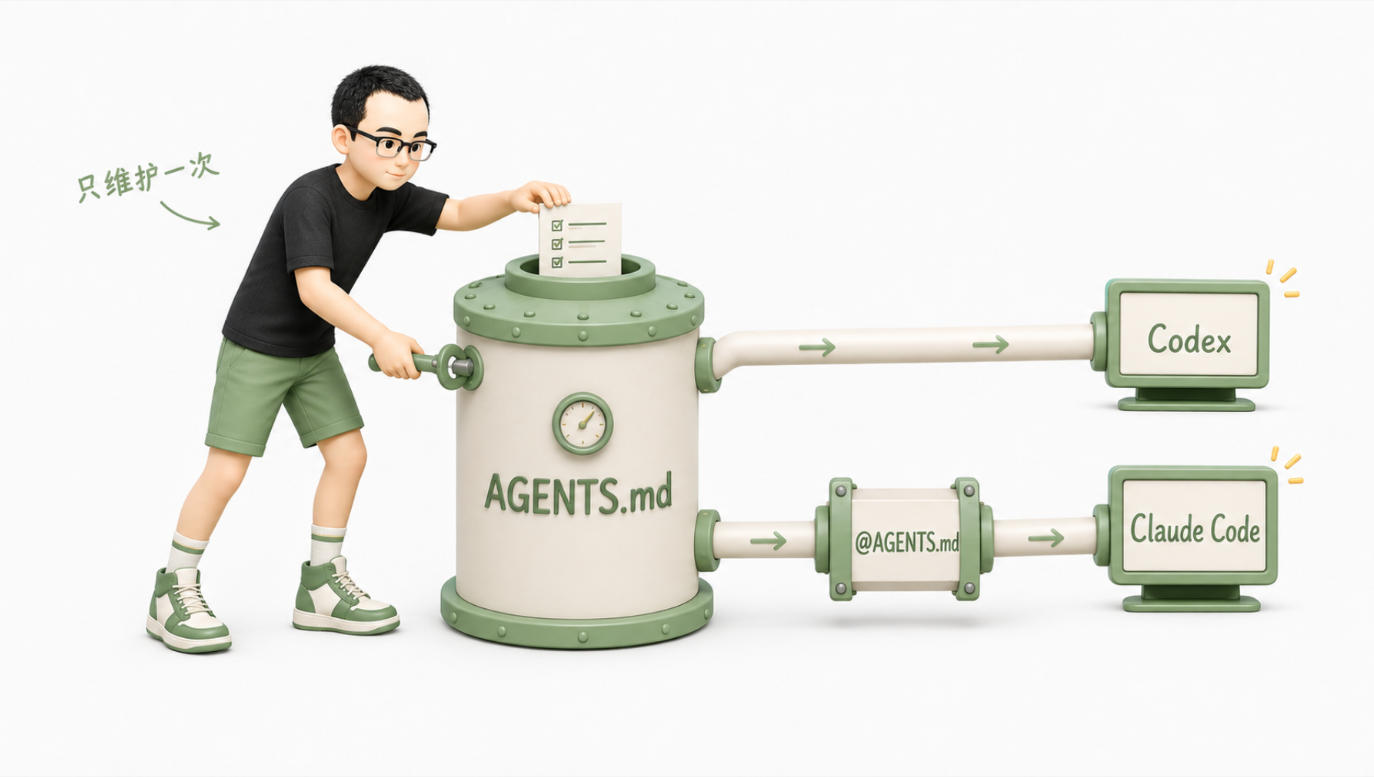
CLAUDE.md can also be made a symbolic link pointing to AGENTS.md, but cross-platform issues and Windows permissions can cause extra trouble. For most teams, @AGENTS.md is more intuitive.
Note: Importing is only to avoid duplicate maintenance and does not save context. The imported content will still be loaded at startup, so the single source of truth must also remain concise.
Chapter Nine: After finishing, verify it actually works
Many problems are not due to poorly written rules but because the file was never loaded.
In Claude Code:
- Run /context to see if the target file appears in Memory files
- Use /memory to view and edit memory files at various levels
In Codex, you can have it repeat the current project rules as seen, as an auxiliary check. Don’t just trust the repeated result; ultimately, validate the behavior with specific tasks.
Loading the source only proves that the Agent saw the file, not that it will follow it. Use a precise small task that triggers the rule, as in previous examples; the real object to validate is behavior, not repetition.
Chapter Ten: Maintenance: Don’t just add, prune as well
My own CLAUDE.md went through this path: at first, I used /init to create it, and then every time Claude made a mistake, I added a rule. At the time, each rule had a reason, but a few months later, looking back, there were duplicate rules, outdated processes, and conflicting requirements.
A good instruction file is more like a garden, not an archive. Maintenance has only two actions: adding and pruning.

When to add
Don’t add a rule immediately because of a one-time mistake. Better triggers are:
- Repeated occurrence of similar errors
- The same review comment is repeatedly raised
- If a certain implicit assumption is missed, the cost is very high
- A certain fixed process has already been executed multiple times
Claude Code's /insights can generate an HTML report of recent local sessions, helping you identify common failure points and usage patterns. It is suitable for finding clues, but the recommendations in the report still require human judgment and cannot be copied wholesale into CLAUDE.md.
For Codex, after the same type of error occurs for the second time, you can let it review the common cause of the two failures and propose a minimal rule. First, check whether the rule is truly general before deciding whether to write it down.
When to Delete
At minimum, check four types of content:
- Code or processes have changed, and the rule no longer matches the actual project
- Two rules express the same thing and can be merged
- The rule conflicts with other levels, documentation, or tool configurations
- The agent can already reliably discover it from the project, making it unnecessary to keep
Claude Code v2.1.206 and above’s /doctor can check the submitted CLAUDE.md: it is recommended to remove directories, dependencies, and architecture overviews that can be deduced from code, and keep traps, reasons, and non-default conventions. Tool recommendations are still just a starting point; the final standard should be based on project facts.
You can adopt this maintenance rhythm:
- Normally, only record recurring issues
- After each important process or architecture change, check related rules
- For example, do merges, deletions, and conflict checks monthly or per version cycle
- After significant upgrades of tools or models, re-validate old rules with real tasks rather than assuming they are always valid
Bonus: A “Gradual Pruning Prompt” You Can Use Directly
The one mentioned at the end of the original video is essentially a prompt for auditing and pruning CLAUDE.md, not a Skill that must be installed. It does not need to be executed frequently, and keeping it as a prompt is more convenient: go to the project root directory, start Claude Code or Codex, and copy the entire block below.
This version of the prompt also supports AGENTS.md and defaults to auditing only, without directly modifying the file. First, review each suggestion and candidate draft, confirm that no project knowledge is mistakenly deleted, and then let the agent execute the changes.

You are now the long-term instruction auditor for this project. Please audit and streamline the CLAUDE.md, AGENTS.md, and related rule files in the project.

The goal is not to achieve the shortest version, but to produce a set of concise, accurate, non-conflicting long-term instructions that can genuinely modify the Agent's behavior, without losing critical business knowledge, team conventions, or security boundaries.

## Permission Boundaries

- This round is read-only by default: you may read project files, configurations, and official documentation, but do not modify, move, or delete any project files.
- Only output a complete audit report with candidate drafts. I must explicitly confirm before you can modify the original files.
- Do not perform write operations such as git commit, push, reset, or checkout.
- Do not change the business meaning of the original rules just to shorten the files.
- Mark uncertain information as "to be confirmed"; do not guess or complete it on your own.

## Step One: Confirm Environment and Loading Scope

1. Determine whether the current project uses Claude Code, Codex, or both.
2. Confirm the current model and version; if the environment is not provided, write "unable to confirm" instead of guessing.
3. Identify all long-term instruction files that could potentially be loaded for this task, including but not limited to:
   - CLAUDE.md
   - CLAUDE.local.md
   - .claude/CLAUDE.md
   - .claude/rules/**/*.md
   - AGENTS.md
   - AGENTS.override.md
4. Explain the scope of each file, the loading order, and which nested files will not be loaded this time.
5. If the project uses both CLAUDE.md and AGENTS.md, check whether they are duplicated, conflicting, or already integrated into a single source of truth through imports.

## Step Two: Verify Current Official Practices

If internet access is available, only consult the official documentation for the corresponding tools:

- Claude Code: Anthropic official documentation
- Codex: OpenAI official documentation

Focus on verifying:

- The current discovery and loading rules for the instruction files- Official recommendations on length, structure, specificity, and conflicts
- Official prompt guidelines for the current model
- Which content is more suitable to be placed in nested rules, Skills, Hooks, permissions, tests, or CI

Record the actual page titles and links you checked. Do not cite search summaries, community articles, or rely on memory to summarize. If you cannot access the internet, explicitly write "Official practices not verified online," then continue to complete the project fact audit.

## Step 3: Verify each rule from the project

Read the necessary code, README, configurations, scripts, and project documentation to determine whether each instruction aligns with the current project. Only read enough material to make the judgment; do not scan the entire repository aimlessly.

For each rule, check the following questions:

1. Can the Agent quickly find it from the code, configuration, directory, or README?
2. Does it belong to implicit knowledge that the Agent cannot reliably judge from the project alone?
3. Will it affect most tasks, or only a specific directory, file type, or workflow?
4. Does it still hold now? Is there any evidence in the project to the contrary?
5. Does it duplicate or conflict with other instructions?
6. Is it specific enough to be executed and verified?
7. Is it a natural language reminder, or a baseline that must be enforced by the program?
8. If deleted or moved, could it cause the Agent to lose critical context?

Do not remove rules merely because "the model is stronger now." Only if supported by project evidence, official practice, or real behavior testing can deletion be recommended.

## Step 4: Classify each rule

Each rule can only be given one primary handling classification:

- Keep: Important, stable, hard to discover independently, and with the correct scope.
- Rewrite: Should be kept, but currently vague, too long, unverifiable, or ambiguous.
- Merge: Expresses the same thing as another rule.
- Sink: Only affects a specific directory or file; should be moved to nested CLAUDE.md, AGENTS.md, or path rules.
- Move to docs: Belongs to large background knowledge or authoritative standards; the main instruction only retains when and where to read it.
- Move to Skill: Belongs to long, repeatable workflows triggered only in specific tasks.- Entrust to the program as a safety net: these are absolute limitations that must not be violated and should be enforced by hooks, permissions, tests, code checks, or CI; a reminder can be kept in the instructions.
- Delete: instructions that can be quickly found independently, are already outdated, purely duplicated, or vague requirements such as "think carefully" or "follow best practices" that cannot be verified.
- To be confirmed: existing evidence is insufficient and must be decided by the project lead.

Each conclusion must provide reasons and evidence. Do not just say "recommend simplifying."

## Step 5: Output in the following format

### A. Audit Summary

- Which instruction files were found
- Which files were actually loaded this time
- Current total number of lines
- How many items are retained, rewritten, merged, migrated, deleted, and to be confirmed
- The three most serious issues

### B. Official Verification

- Current tools and models
- Official pages and links consulted
- Which existing writings no longer comply with current official practices
- Which judgments remain uncertain due to inability to access the internet or verify the model

### C. Item-by-Item Audit Table

The table should at least include:

| File & Location | Original Rule Summary | Conclusion | Project Evidence | Reason | Suggested Destination or Rewrite |

Locations should be as precise as possible down to the heading or line number. In case of conflicts, list the conflicting rule locations simultaneously.

### D. Migration Checklist

List suggested content to move to the following locations separately:

- Nested instructions or path rules
- Independent project documents
- Skill
- Hook, permissions, tests, code checks, or CI

Only indicate what should be migrated and why, do not create these files in this round.

### E. Complete Candidate Draft

Provide a streamlined full CLAUDE.md or AGENTS.md, not just a diff.

Requirements:

- Keep specific information from the original text that is still valuable
- Use clear Markdown headings and short items
- Mention each item only once
- Rules must be specific, executable, and verifiable
- Do not add new rules without project evidence
- If rules are shared by two tools, clearly state the unique source and method of import

### F. Issues to Be Confirmed

Only list issues that will materially affect the deletion or modification results. For each issue, indicate which rule would be retained, moved, or deleted depending on different answers.### G. Verification Plan

Design 2–4 real small tasks, each task triggering only one or two key rules, to compare the actual behavior before and after modification. Do not use 'restate which rules you have read' as a substitute for behavior verification.

## Completion Criteria

It is considered complete only when all of the following conditions are met:

- Each existing rule has a clear decision on whether to keep or remove it
- All deletion and migration suggestions have project evidence
- Duplicates, conflicts, outdated, and unverifiable content have been identified
- The candidate draft can be used directly by copying
- No files have been modified

Stop after outputting and wait for my confirmation. Do not execute the candidate draft proactively.
The first time you run it, I suggest not adding the phrase 'just fix it for me' after the prompt. First, look at the audit table, paying special attention to the 'Delete' and 'Pending Confirmation' columns. The agent can identify duplicate and outdated content, but it cannot decide the business realities that are not written into the code for you.
After confirming that the report has no misjudgments, then send:
Make modifications according to the candidate draft just confirmed. Keep a copy of the pre-modification version, and do not perform any git write operations. After modification, recheck the loading range, duplicates, conflicts, and Markdown format, and report the actual changes and migration items that have not yet been handled.If this prompt will need to be run frequently in the future, consider turning it into a Skill. Whether it's worth making it a Skill does not depend on how long the workflow is, but on whether it has already become a recurring process with relatively stable input and output.
Finally, use this checklist to review your files
Before finalizing, check these six items:
- Remove facts that can be quickly found from code, configuration, and README
- Keep only rules in the root directory that most tasks will use
- Move local rules and long workflows to the corresponding directory or Skill
- Ensure high-risk prohibitions are backed by permissions, hooks, tests, or CI
- Make sure each requirement is specific, actionable, and verifiable
- Eliminate duplicate, conflicting, or outdated rules and verify behavior with specific tasks
A good CLAUDE.md or AGENTS.md is not a compilation of all project materials, but the minimal set of rules that the Agent cannot discover by itself yet will continuously affect correct results.
It will never truly be “finished.” Code changes, team workflows change, and the Agent’s capabilities change. Your goal is not to keep adding to it, but to ensure it always retains only the content that is still worth occupying context at this moment.
Discussion
Support the author